
User guide
Everything Rondo does, step by step.
Rondo is a macOS workspace built around Claude Code. Open a folder as a Vault, and its structure, instructions, and past work become the context your agents run in. You ask in plain language; results come back as files in your folder.
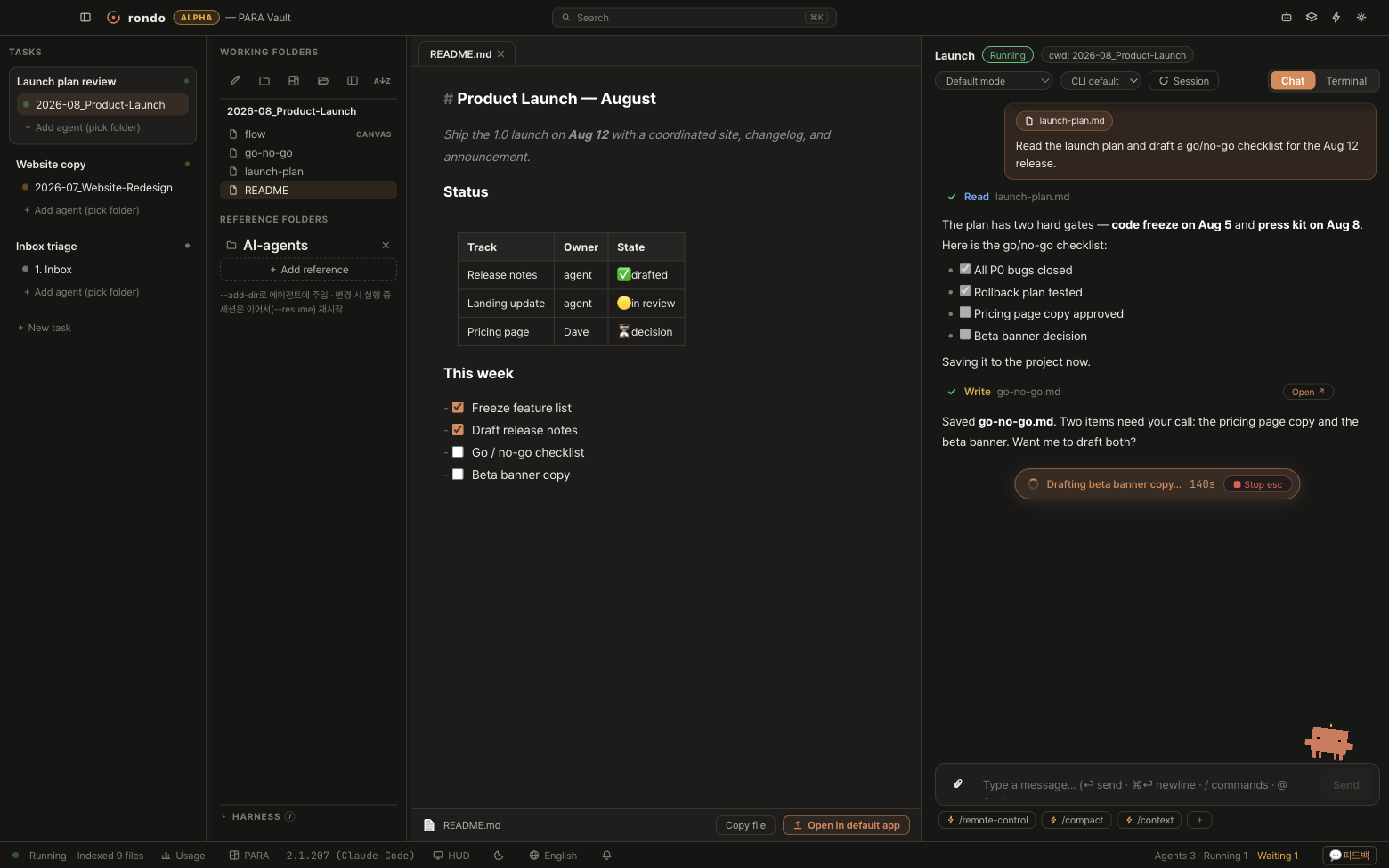
This guide reads top to bottom as a course — install, a 10-minute tutorial, then every feature with steps and examples. Or jump straight to a section from the sidebar. It’s updated with every release.
macOS on Apple Silicon · free during beta · the download button always serves the latest build
Before you install — three things
Rondo runs the real Claude Code CLI underneath, so it needs three things on your Mac. If you already use Claude Code in a terminal, you have all three — skip to Installing Rondo.
- A Mac with Apple Silicon. Any M1 or newer. (Intel Macs and Windows aren’t supported yet.)
- A Claude account. A Claude Pro/Max subscription or an Anthropic API key — whatever you’d use with Claude Code. Rondo itself is free during beta; your Claude usage is billed exactly as it would be in a terminal.
- The Claude Code CLI, signed in once. Open Terminal.app and paste:
npm install -g @anthropic-ai/claude-code(needs Node.js — install from nodejs.org if the command isn’t found). Then runclaudeonce and follow the sign-in link. When you see Claude’s prompt in the terminal, you’re done — you never have to open the terminal again.
Quick check: type claude --version in Terminal. If a version number prints, Rondo will work.
Installing Rondo
- Download. Click Download for macOS on the home page. You get a DMG file (~200 MB) — the button always serves the latest version.
- Install. Open the DMG and drag Rondo into Applications.
- First launch — macOS will stop you once. Beta builds aren’t notarized yet, so the first double-click is blocked. Approving it takes about fifteen seconds and you only do it once — the steps, with screenshots, are in If macOS blocks Rondo on first launch.
- You’ll see the welcome screen asking you to open a folder as a Vault. That’s the next section.
If macOS blocks Rondo on first launch
Beta builds aren’t notarized by Apple yet, so macOS stops the first launch and says it “cannot verify that Rondo is free of malware.” That is Apple saying we have not checked this app — not that anything was found. On macOS Sequoia and later, right-click → Open no longer clears it; you approve it once in System Settings. It takes about fifteen seconds and you never see it again.
- Try to open Rondo once. Double-click it in Applications. A dialog appears and blocks it — that is expected. Click Done.
- Open System Settings → Privacy & Security. Scroll to the Security group. You’ll see the line “Rondo was blocked to protect your Mac” with an Open Anyway button next to it. Click it and authenticate with Touch ID or your password.
- Confirm once more. The same dialog returns, now with Open Anyway on it. Click that — not Move to Trash. Rondo launches, and macOS remembers the decision for every launch after this one.
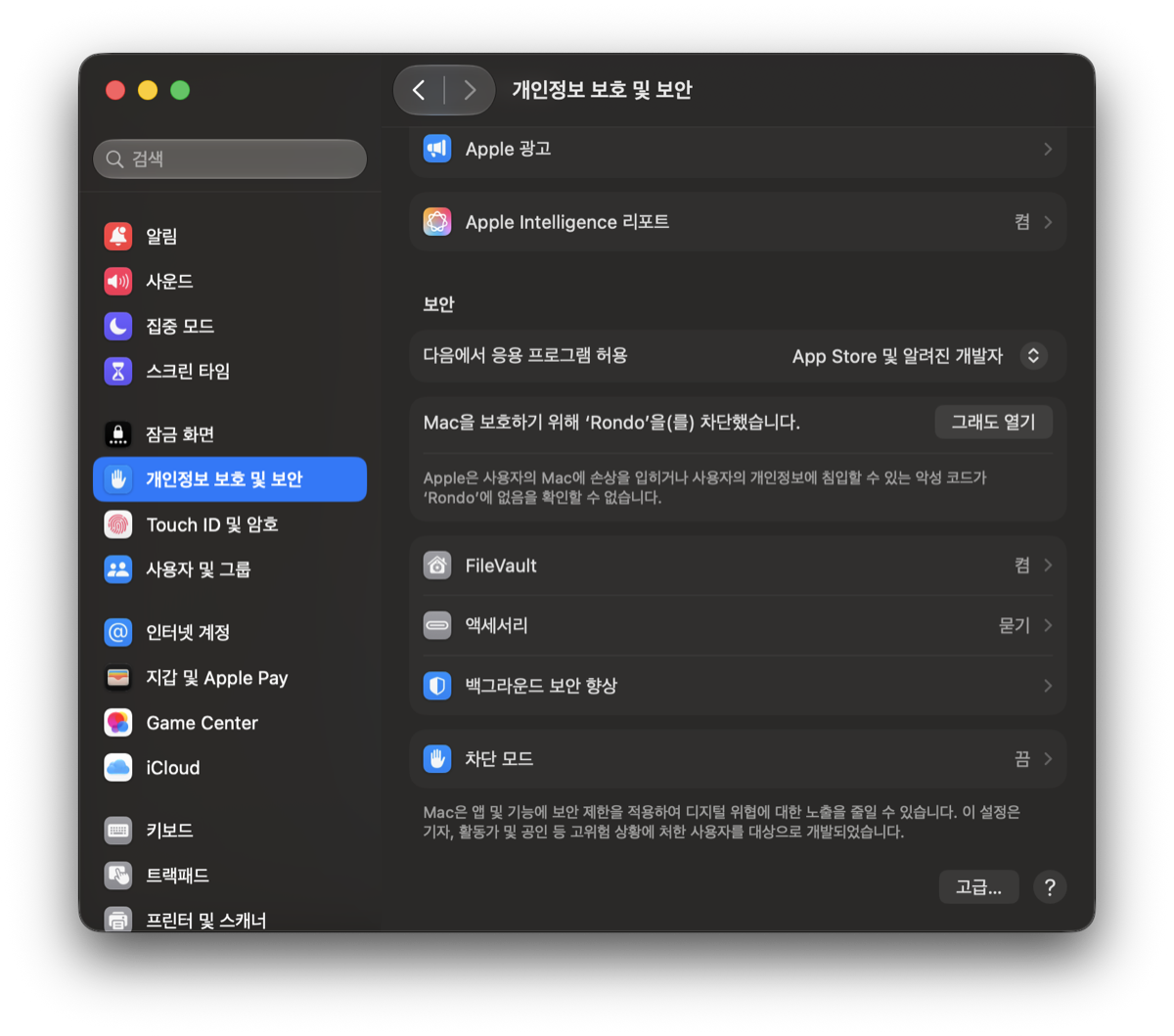
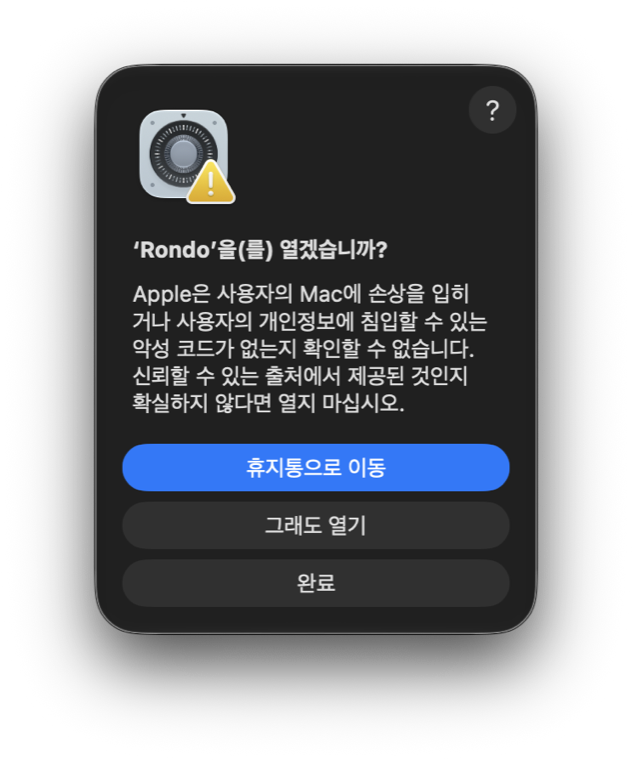
Why this happens: notarization requires a paid Apple Developer ID, which the beta doesn’t have yet. The build is still signed and its checksum is published with every release — nothing about it is hidden.
Opening a vault
A vault is just a folder that Rondo opens — like Obsidian. There are two ways to start, and both are safe:
- Start fresh. Make a new folder anywhere (say
~/Documents/MyVault) and open it. Rondo scaffolds a PARA skeleton —1. Inbox,2. Projects,3. Areas,4. Resources,5. Archives— plus a starterCLAUDE.mdwith the PARA folder rules, a default task and agent on the vault root, and opens thatCLAUDE.mdas your first document. You can rename or delete any of it later. - Or open a folder you already have — your documents folder, an Obsidian vault, a project directory. Rondo doesn’t touch a single existing file. Everything it needs lives in one new folder,
.aiworkspace/. - Check the folder tree in column ②. If you see your files, the vault is open. The harness dock below it shows what’s configured here (probably a few zeros right now — that’s fine and normal).
Worried about your files? The rule is simple: your files are the truth. Rondo writes only inside .aiworkspace/, and deleting the app never deletes your work.
Your first conversation
- Create a Rondo. Click
+ New Rondoat the bottom of the left rail and pick the folder you want to work in — the name fills in from the folder. A Rondo is one folder plus one agent. Click+ New taskat the bottom of the left rail and give it a name — a task is “a thing you’re working on”, like Trip planning or Reading notes. - That is it — the agent is already there. Every Rondo comes with its own agent, which starts in Rest: a quiet dot, ready. Column ② shows the Rondo folder, ③ your documents, ④ the conversation. Click
+ Add agentunder your new task and pick the folder it should work in. The agent starts in Rest — a quiet dot, ready. - Ask something easy. Type into the composer, in your own words: “What’s in this folder?” — the agent answers using
rondo-vault, already knowing your folder tree. No setup, no pasting. - Watch the cards. As it works you’ll see tool cards — Read, Write, Bash — stack up. Click any card to see exactly what happened.
- Answer when asked. If the agent needs an approval, the session turns amber (Fermata) and a permission card appears with the exact action. Click approve or deny. You are always the one who decides.
- Make your first file. Try: “Make a file called hello.md that explains what you can do for me.” — a Write card appears; click Open on it and the document opens in column ③. That file is now really in your folder.
Tutorial · 10 minutes
Plan a trip, start to finish
The fastest way to understand Rondo is one small real project. We’ll plan a 3-day trip — no files needed to start.
- Make the folder. In your vault’s
2. Projects, createJeju-Trip(use Finder or ask the agent to do it). Create a task called Jeju trip and add an agent in that folder. - Brief once. Say: “We’re going to Jeju for 3 days in October, two adults, relaxed pace, seafood lovers, budget around ₩800,000. Save this brief as trip-brief.md.” — a Write card appears. Your context now lives in the folder, not in the chat.
- Ask for the plan. “Draft a day-by-day itinerary as itinerary.md.” Notice what you didn’t do: repeat the dates, the budget, the seafood. It read trip-brief.md by itself.
- Open it beside the chat. Click the Write card’s Open — the itinerary renders in column ③ as a clean document with headings and checklists.
- Refine in plain words. “Day 2 looks packed. Move the museum to day 3 and add a beach afternoon.” The document updates; you watch it happen.
- Add a checklist. “Make packing-list.md with checkboxes.” Open it and tick the boxes yourself — checklists are clickable.
- Come back tomorrow. Quit Rondo, reopen, and continue the same conversation: “Add restaurant reservations for day 1.” The session resumed; the folder remembers everything.
What you just learned: brief once into a file → every later ask gets shorter → results live in the folder, not the chat. That’s the whole idea of Rondo.
Tutorial · the loop
A project that builds up: reading notes → a blog post
Rondo shines on work that accumulates. Here’s the same pattern applied to writing — the identical flow works for lectures, books, or product plans.
- Collect. In a
Readingfolder, keep one note per book — even rough ones. “Make a note template for my reading notes” gets you started. - Synthesize. After a few books: “Read all my notes and list the three ideas that keep coming back, as themes.md.”
- Draft. “Turn theme 2 into a blog post outline.” — it already knows theme 2; it wrote themes.md.
- Write & polish. “Draft the full post.” Then open the draft, select any rough paragraph, and use the selection AI — rewrite, summarize, continue — right in the document.
- Next week, go again. New book, new note, then: “Does this book change themes.md?” The project deepens instead of restarting.
The workspace — four columns
Everything happens on one screen, left to right. Nothing hides behind a window switch.
- ① Tasks — every task with its agents and a status dot. Coral = working, amber = waiting for you. A collapsed task still shows an aggregate dot.
- ② Folders + harness — your vault’s folder tree; click a file to open it in ③. The toolbar’s eye button toggles hidden (dot) files, and symlinked folders open like real ones. Below the tree: quick actions, reference folders, and the harness dock.
- ③ Documents — tabs for markdown, canvas, PDF and office files, rendered live.
- ④ Agent — the conversation: chat or terminal, tool cards, permission cards.
- Top bar — vault name and
⌘Kuniversal search: files, tasks, commands, from anywhere. - Status bar — running/waiting counts, usage gauge, HUD toggle, app language, notification history.
- Tree file management —
⌘/⇧-click multi-selects; drag the selection (an “N items” badge follows the cursor) onto any folder — or onto a file to target that file’s folder — and everything moves together. Right-click gives Move to folder… with a picker, plus batch trash.
Rondos & groups
A Rondo is the unit of work: one folder plus one agent that lives in it. That is the whole idea — pick a folder, and you have a Rondo. Groups only bundle Rondos together; they have no folder and no session of their own.
- Create —
+ New Rondoin the left rail. Pick the folder, and the name fills in from the folder (change it if you like). That is the whole setup; there is no second step. —+ New task, name it after the work. Then+ Add agentand pick its folder. - Grouping is optional — Rondos can sit at the top level forever. When you have enough to want tidying, drag one Rondo onto another to bundle them, or use
+ New groupand drag Rondos in. A House move group might hold aContractsRondo and aBudgetRondo. — e.g. a House move task with one agent inContractsand another inBudget. Both listed under the same task, each with its own session. - Claude Code or Codex — choose the CLI per agent. Cards, states and resume work the same.
- Reference folders — per agent: select an agent, then attach other folders (the
+ Add referencebox in column ②) and they ride into that agent’s sessions via--add-dir. Each agent keeps its own; adding one never touches the others. Example: attach last year’s trip folder for the planning agent. - Rename / remove — click a name to edit in place. Removing an agent never touches the folder’s files.
- Finding what you just worked on — ‹ › in the top-left flips between the current and previous agent, like browser back/forward. The five most recent agents sit at the bottom-left in the order you opened them; × removes one from that list without deleting the agent.
- Collapse a task — click the chevron beside a task name to fold its agents away; the running/total badge stays. Handy when one task holds many agents. Folding is remembered, and picking an agent unfolds its task.
- Favorites — hover a row and click ☆ (or use the right-click menu) to pin files and folders to a Favorites section at the top of the tree. It follows the vault, so switching Rondos keeps them. — hover a row and click ☆ (or use the right-click menu) to pin files and folders to a Favorites section at the top of the tree. It follows the vault, so switching work folders keeps them.
Chatting with an agent
Ask in your own words. Everything the agent does becomes a visible card; everything it needs from you becomes a question you answer with a click.
Attaching is part of writing, so the + sits inside the input on the left, opposite the send button. Whatever you pick goes in as an @ reference — the same thing that happens when you drag a file in or paste a screenshot.
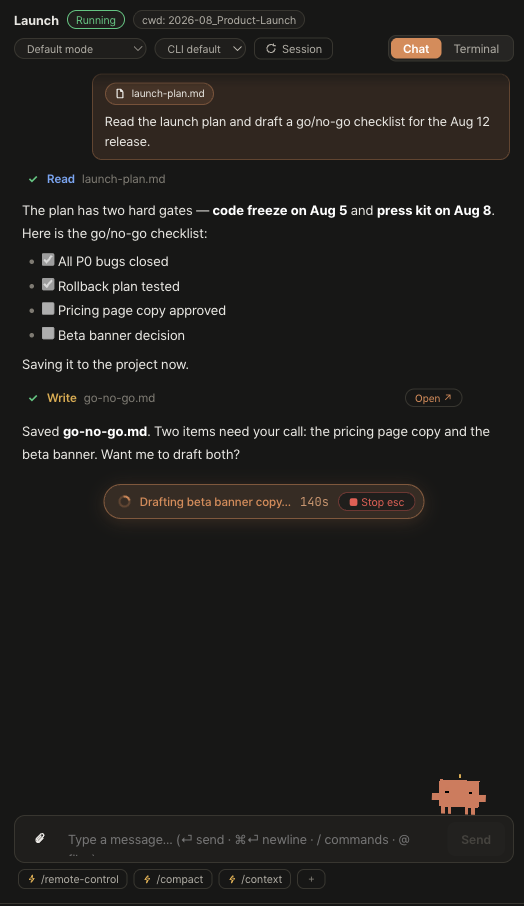
- Tool cards — Read, Write, Bash, Task, MCP calls. Click to expand the output; a Write card’s Open button opens the file in ③. Edit/Write cards expand into a real code diff — line numbers, syntax colors, green/red lines and a
+N −Mstat in the header. - Permission cards — the exact action, approve or deny. The header’s mode selector switches how much gets asked: from confirm-everything to full auto, per session.
- Model & thinking — per agent, in the session header: model choice and thinking depth.
- Slash commands & skills — type
/for autocomplete across built-ins, skills, and your own commands, badged by source — mid-sentence too, completing right at the cursor. Pin favorites to the chip bar. - Prompt refine ✨ — the sparkle button upgrades your rough draft before sending: spelling fixed, vague words made concrete from the conversation, multiple asks numbered, constraints kept bold.
⌘Zbrings your original back. - Paste images —
⌘Va screenshot straight into the composer; it lands as an inline chip. “Why does this chart look wrong?” works. - Attach files inline — drop a file, click 📎, or pick from
@autocomplete and it becomes a chip inside your sentence, right at the cursor: “Fix▤ README.mdusing▤ TODO.md”. Backspace deletes a chip whole, ✕ removes it, and the agent receives the real paths. Sent messages render the same inline chips, and↑history brings them back into the composer. - The plan, pinned — when the agent works through a to-do list, it pins above the chat with live progress.
- Quick actions — Tidy folder / Summarize folder in column ② run on a fast model in a separate session; your main conversation stays clean. Each run also appears in the Rondo rail as a ⚡ row under its agent — live status at a glance, click to open its drawer. Fully yours to shape: the ✳ editor renames actions, edits their prompt and model, deletes them, and adds new ones. — Tidy folder / Summarize folder in column ② run on a fast model in a separate session; your main conversation stays clean. Each run also appears in the task rail as a ⚡ row under its agent — live status at a glance, click to open its drawer. Fully yours to shape: the ✳ editor renames actions, edits their prompt and model, deletes them, and adds new ones.
- Keep going until it's done —
/goal <condition>sets a goal for that agent. After each turn Rondo checks in and continues automatically until the agent declares it reached, up to 10 continuations. A badge shows the goal and the count;/goal clear, the ✕, or Esc stops it. Errors stop it too, so a failing turn never loops. - Agents can show, not just tell — after writing a file the agent calls
rondo_openand it appears in your document section;rondo_revealpoints at it in the tree. Vault search, tree and folder-role tools have been there all along; the vault CLAUDE.md now says when to use each.
Easy asks to steal: “Rename these files consistently” · “Which of these receipts are from March?” · “Summarize this folder for someone new”.
Sessions & the state language
Every session is in one of five named states — and every dot, HUD and notification uses the same names, so nothing ever disagrees.
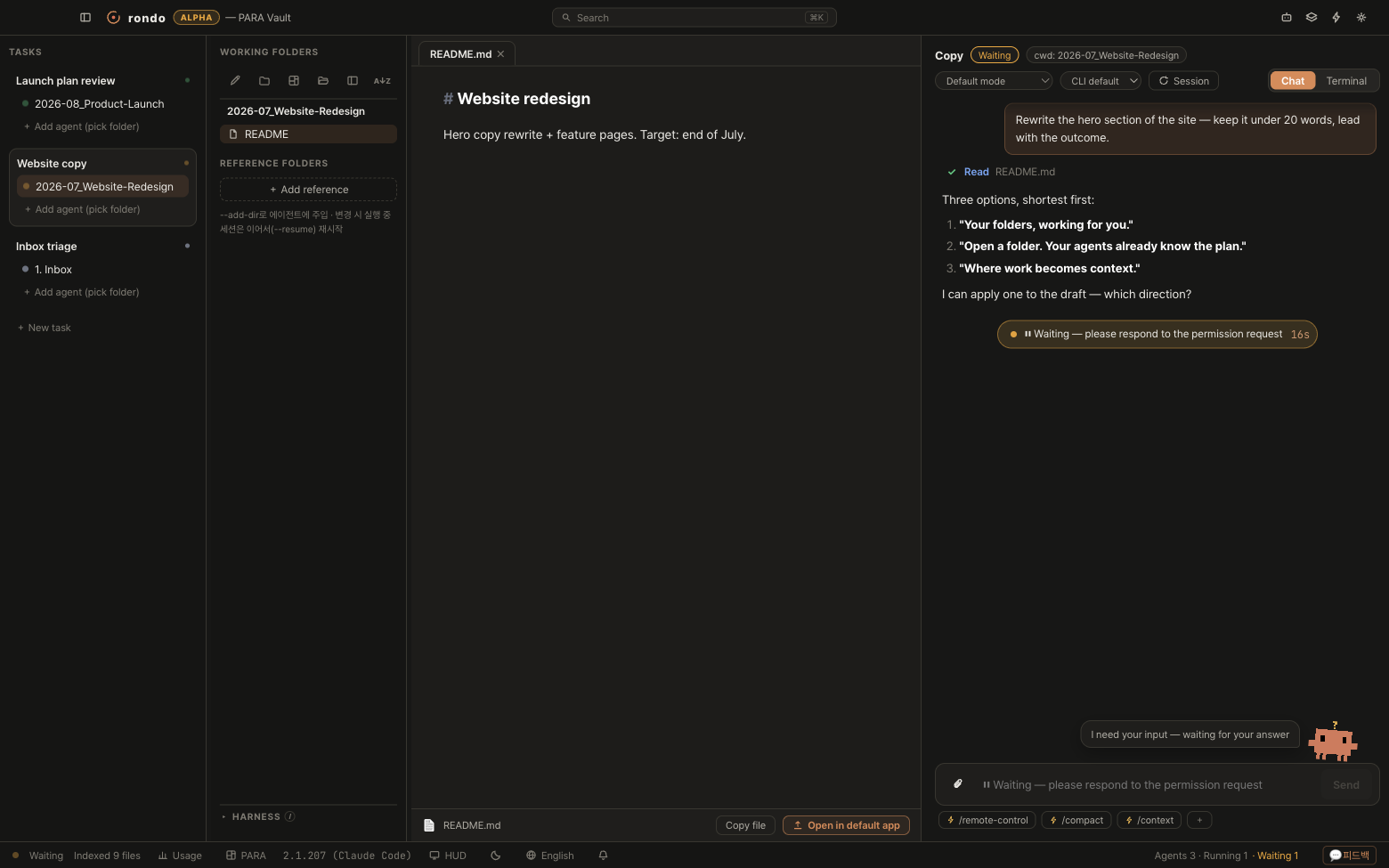
- Rest idle · Playing working · Fermata 𝄐 waiting for you · Coda done · Off-key errored (resumable).
- Resume, really — Rondo keeps the CLI’s session ID and reattaches with
--resume. Quit, restart, continue with history intact. Off-key sessions restart the same way. - Terminal handoff — the Chat/Terminal segment hands the same session to a real PTY with the original TUI. Use it when you want raw terminal control; flip back anytime.
- Interrupted sessions are visible — if the app closes mid-turn, the conversation says where it stopped and the agent shows as Interrupted; one that ended badly stays Ended with error rather than quietly going idle. Send a message and it resumes from there.
- The session menu — the
⟳ Sessionbutton: restart, resume, or start clean.
Subagents you can watch
For a big ask, the agent can fan out helpers (the Task tool). In a terminal that’s a spinner; in Rondo every helper is a live card.
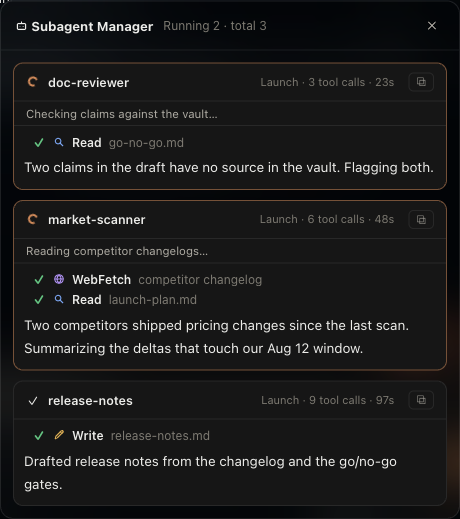
- A card per worker — name, owner, tool calls, elapsed time, and a live feed of its current step.
- Pop one out — the corner button sends a card to an always-on-top mini window. Park it and go do something else.
- Counts everywhere — under the agent in the rail (running first, capped at 8) and totals in the status bar. The tree shows in terminal mode too.
- You don’t dispatch them — you ask normally; the agent decides when to fan out, exactly as in a terminal. Rondo adds the visibility.
Try it: “Compare these five venue PDFs for the workshop — price, capacity, distance — as a table.” Watch it split the work.
Documents — the Markdown editor
Markdown opens as a clean document: no # and * clutter — markers appear only on the line you’re editing. And your files are never reformatted behind your back.
- Read & write in one view — headings, quotes, bullets, checklists render clean; click anywhere and just type. Checklists are tickable.
- Tables — click a cell, type; Home/End, undo, and whole-table delete behave.
- Selection toolbar + AI — select text: formatting plus rewrite · summarize · translate · continue. Results replace (or follow) the selection;
⌘Zundoes. - Long documents — the TOC panel jumps sections;
⌘Fsearches within. - Source toggle — see the raw markdown without losing your place; toggle back.
- Export to PDF — what you see is what prints.
- Code & diagrams — code blocks with a copy button and collapsing;
mermaidblocks render as diagrams. - Images — paste them in, drag to resize.
- Typography — reading font and size settings.
- Obsidian-friendly — wikilinks, callouts, frontmatter and
.canvasboards render as expected; PDF and office files open in tabs too. - Interactive HTML — .html files open live (scripts, forms and all) with auto-fit: fixed-width pages scale down to the pane; the Fit button and −/+ controls hand you manual zoom.
- Drop to reference — drag a file or folder from the Rondo folder onto a document: it lands at the drop point as a wiki link (
[[note]]), images embed on their own line (![[image.png]]), folders become a relative markdown link. — drag a file or folder from the work folder onto a document: it lands at the drop point as a wiki link ([[note]]), images embed on their own line (![[image.png]]), folders become a relative markdown link. - Follows the disk — when an agent rewrites a file you have open, the tab updates. If you were mid-edit, a banner offers Load from disk or Keep my edits and pauses autosave until you choose — no stale buffer can overwrite the agent’s work.
- Local previews in a tab — a
localhostlink from an agent opens in the document section, so a comparison board or design preview sits right beside the chat. The address bar has reload and open-in-browser. - Removing an image — hover it and click the ✕ at its top-right. That removes the image from the document; the file on disk stays, and
⌘Zbrings it back. - Word, Excel & PowerPoint — office files open in their original layout: tables, headings and signature blocks look like the real document, not extracted text. Converted on open (instantly after the first time), with an Original layout ↔ Text/Table toggle — text is easier to search and copy, and a wide spreadsheet reads better as a table.
- Zero churn — open and save all day; your markdown stays byte-for-byte yours. Tabs whose files get deleted clean themselves up.
Flow: the agent writes meeting-summary.md → it opens beside the chat → you fix two lines by hand → select the intro → “rewrite” → export to PDF for your team.
The window itself — glass, panels, settings
Rondo’s four panels are one material at four depths: pure black at different opacities, over your desktop. The document is the most solid because that’s where you read and write; the rail is the lightest because it’s the edge of the window. Nothing is coloured to mark a boundary — the step in opacity is the boundary.
- Popups stay inside their panel — a menu, tooltip or the formatting bar never spills onto a neighbouring column. If there isn’t room below, it flips above; if there isn’t room either way, it shrinks and scrolls rather than showing you half of itself.
- Menus and popups are glass too — you can see what they’re covering, blurred. They sit in front by their shadow, not by being opaque.
- Settings is a window —
⌘,or the gear. Five tabs (General · Appearance · Documents · Agents · About) at a fixed size, so a tab you clicked once is in the same place the next time. - Prefer it solid? Settings → Appearance → turn translucency off. The depth order stays; only the transparency goes.
- Document tabs — the filename sits centred; hover and it slides left to reveal ✕. The tab never changes width, so the tabs beside it don’t move.
todo.md — the request sheet you and the agent share
Put a todo.md at the root of a Rondo folder and it appears as a TODO card in column ②. It is an ordinary markdown file — you write what you want fixed or made as - [ ] lines, and the agent reads the same file. One list, two readers.
- Write a line, get a change —
- [ ] the close button is hard to hitis enough. Attach evidence by putting![[screenshot.png]]on the line right below it; the agent treats it as that item’s evidence. - Your sentence survives — when the agent finishes it flips your line to
- [x]and moves it to Done, keeping your words and appending what it actually did. That’s the point: you can compare what you asked for against what you got, months later. - Five rows, then “more” — the card shows the first five items and a progress bar; the rest are one click away, in place.
- The agent doesn’t add requests — anything that needs your approval goes to a Needs a decision section instead, so the list stays yours.
- Drag to reorder, and keep titles short — pull an item up or down and the line moves in the file itself; a marker shows where it will land. Finished items always collect at the bottom, so you reorder within a group rather than across the divide. Because the card gives each item one line, keep the title under 55 Latin characters (24 for CJK) and push the rest past a
—:- [ ] Title — the details. Nothing is truncated in the file; you are just choosing where the line gets cut on screen.
Context — what the agent already knows
The gap between you and an agent is context. Rondo closes it from three directions, and shows you each one.
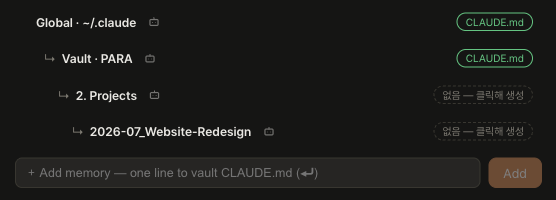
- Instructions (CLAUDE.md) — standing rules the agent reads every session: “answer in Korean”, “dates are YYYY-MM-DD”, “drafts go in /drafts”. The panel shows the chain global → vault → folder; click a level to edit, or type one line in the memory box and press ⏎.
- Reference folders — per task, injected with
--add-dir. Change them mid-session; Rondo resumes so the conversation survives. - The folder itself — yesterday’s output is today’s input, automatically. This is the loop; it needs no setting.
rondo-vault— a built-in MCP server in every session:vault_tree(the shape),vault_search(role-aware search),vault_roles(what folders mean),vault_recent(what moved lately). The agent asks instead of you pasting.
Try the memory box: type “I prefer short bullet answers” → ⏎ → every future session in this vault knows.
Structure & PARA
Folder names are for people. A structure profile tells agents what the folders mean, so “file this away” and “find my active projects” actually work.
- PARA by default — new vaults scaffold Projects (deadlines), Areas (ongoing), Resources (interests), Archives (done). A tidy home for everything, from day one.
structure.yml— in.aiworkspace/, maps roles → paths. Rename2. ProjectstoWork; the role survives, everything keeps working.- Search knows archive —
vault_searchranks archived folders below current work. Old projects stop outranking this week. - Your own structure? Switch the preset to
customand map roles onto what you already run. Saving applies instantly — no reindex, no restart.
Payoff: “File these five downloads where they belong” — the agent proposes PARA homes; you approve, it moves them.
The harness — your whole setup, visible
Agents, skills, hooks, MCP servers, commands, permissions, model override — everything that silently applies when a session starts. Rondo reads it before you type, and it reads the same places Claude Code does: this folder, every folder above it, and your home directory. Keep four commands at your vault root and every Rondo underneath inherits them.
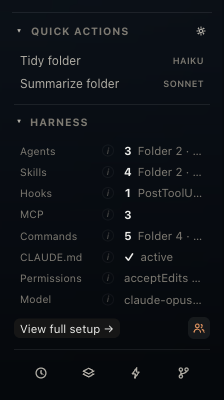
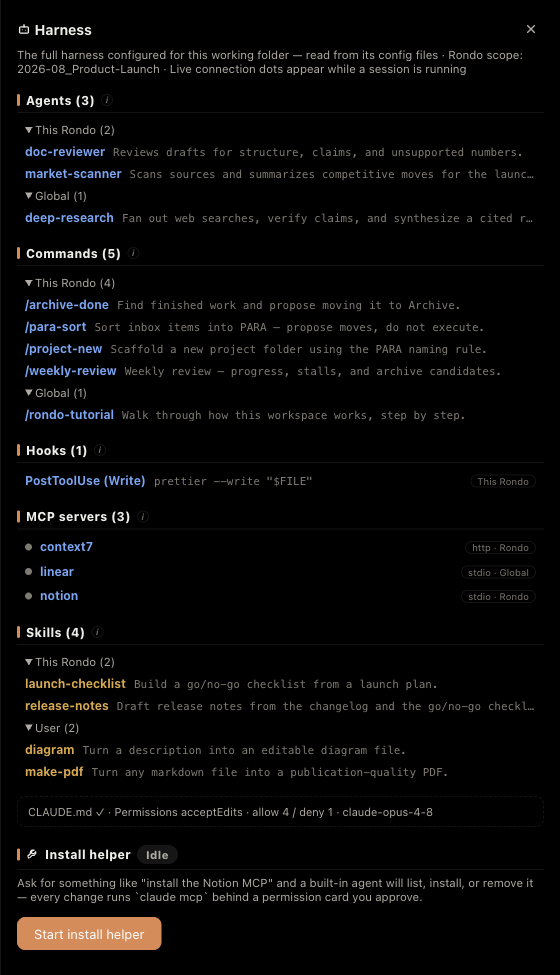
- How to read it — glance before a big run: which agents exist, how many skills apply, whether hooks will fire, which MCP servers are up, what permission mode you’re in.
- Rows open their source — an agent opens its
.md, a hook itssettings.json, a command its editor. - The count is the total — the big number is everything that applies, with the breakdown beside it (folder 2 · parent 4 · global 1). A folder that inherits everything no longer looks the same as one that has nothing.
- claude.ai connectors show up too — Gmail, Notion, Figma and friends live on your Anthropic account, not in a config file, so no file scan can find them. Rondo lists them anyway and the dot tells you whether the running session actually connected. (Skills built into the Claude Code binary still can’t be counted — nothing on disk to read.)
- Define an expert once — a file in
.claude/agents(e.g. contract-review) becomes a specialist any session can call: “Have contract-review look at this lease.” - Hooks in full — event, matcher, and the exact shell command. Know what runs before it runs.
- Agent-teams toggle — the small team icon beside View full setup flips the experimental agent-teams mode (same switch as Settings; applies from the next session).
MCP servers — live, not guessed
MCP servers give agents extra tools (Notion, web docs, your vault index…). Config is scattered and failures are silent — so Rondo shows live status instead.
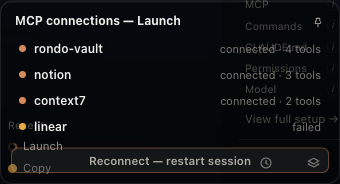
linear failed — and the reconnect button is right there.- One list, every source — global
~/.claude.json, project entries, project.mcp.json, plugin servers. Each row: transport + source. - Live dots — connected / connecting / failed, read from the running session, with per-server tool counts. A connected server with 0 tools is a clue.
- Reconnect in one click — a server dropped? The status bar popup restarts the session right there.
- Install by asking — “add the Notion MCP” → the built-in helper runs
claude mcp addfor you, behind a permission card you approve.
Notifications, menu bar & HUD
Delegate, walk away, and still know the moment you’re needed — from three places that survive you switching apps.
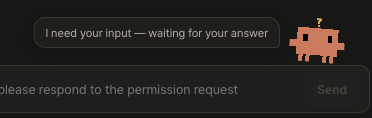
- Menu bar — idle template icon → coral pulse while working → amber +
⏸ 2when sessions wait. Click for the board; a row jumps into that session. Right-click: open Rondo (⌘⇧R), HUD, quit. - Native notifications — banner + sound the moment a session hits Fermata; clicking lands you in that chat. Every alert names the task · agent and carries a one-line briefing — the agent’s last words on completion, the error gist, or the tool awaiting permission. Missed ones stay in the notification history (bell icon, status bar).
- Floating HUD — a small always-on-top strip with every agent’s state. Toggle from the status bar or menu bar; park it anywhere.
- Dock badge — the waiting count on the app icon.
- Turn recap — when a worked turn finishes, the chat ends with a ✻ recap card (tool count · files edited · duration + the agent’s last words), and the completion notification carries the same summary. Rondo builds this itself — the CLI’s session recap is interactive-terminal-only.
The intended workflow: give three agents work, go make coffee. The menu bar will tell you which one needs you, and only when it actually does.
Your phone and browser: Rondo Remote
Your Mac keeps running the work. Your phone becomes a window into it — see what every Rondo is doing, send an instruction, approve a tool, stop a run.
- Turn it on. Settings → Remote access → the switch. Rondo shows the addresses it is listening on. It listens on loopback and your Tailscale network only — never on the open internet, and it never opens a port on your router.
- Pair the phone. Press + Add remote device for a six-digit code (valid two minutes, single use). Open that address in your phone’s browser and type the code. The device is listed in Settings, and you can revoke it there at any time.
- What you can do from the phone. The Rondo list with live status, the conversation, sending an instruction, approving or denying a tool, stopping a run, and checking off
todo.md. Waiting-for-approval is the loudest thing on the list, because that is usually why you opened it. - What it deliberately cannot do. No document editor, canvas, terminal, or harness — and no writing to your vault beyond
todo.md. The remote screen never runs an agent and never becomes a second owner of your files; that is enforced in the gateway, not by convention. - On another Mac. Run
open -a Rondo --args --remote http://<address>and you get the same window as a desktop app. That mode starts no vault, no tray, no indexer, no sessions — so opening Rondo on a laptop can no longer collide with the Mac that owns the folder. - Interruptions are normal. Switch Wi-Fi to cellular, walk out of range, close the tab — it reconnects and replays what you missed, without duplicates.
The point is not to work from your phone. It is that a run should not sit waiting for an approval just because you left the desk.
Update highlights
The beta moves fast; the download button always serves the latest build. Newest first:
- v0.0.359 · The thinking stays while tools run — the thought used to vanish about a second after it appeared, so the status chip read “Running Bash…” for the next half minute. Now the thought stays in the chip until the answer starts. Background output also tells the truth: a file that exists but is still empty (a command piping into
tailwrites only when it finishes) no longer reads as “no output”. - v0.0.358 · Background output, found not remembered — stepping into a background task now shows its live output even when Rondo never saw the file path (monitors never report one, and an app restart erased what it had seen). Rondo looks the file up by task id instead. It says “looking…” while searching and only claims there is no output when there really is none.
- v0.0.357 · Thinking, live — while the agent is thinking, the status box above the composer (“Working… 26s · Stop”) shows the tail of the thought as it streams. When the thought ends it stays in the chat as the folded line from v0.0.356.
- v0.0.356 · See the thinking, pick one line, know when it is waiting — the agent’s thinking now appears between tool calls as a folded one-liner (click to expand), in the main chat and inside subagents. The activity bar and the rail’s subagent list are light trees: a guide line, a coloured dot per agent, hover and click per line — no box outline. When the main agent has handed work to background agents, the bar, the mascot and the rail hourglass all say “waiting” instead of looking finished. Table “+” buttons only appear when the cursor is near the bottom or right edge.
- v0.0.355 · Pick a subagent, watch it work — subagent cards in the chat are clickable again (the CLI renamed the tool from Task to Agent and the card had not followed), and stepping into a background shell now follows its output file live instead of saying “no live output here”. Background subagents show their tool calls and messages as they happen.
- v0.0.354 · No more false “cut off here” — right after v0.0.353, a running conversation showed “Cut off here — the app closed” after every tool call even though nothing had stopped. The screen was mistaking its own save for someone else’s. Fixed, and the false markers already written into your logs are removed the next time that conversation opens. A real cut (the app really closed mid-turn) is still marked.
- v0.0.353 · Saved means saved — a product-wide review found six places where the screen said one thing and the disk said another. All six are fixed: the Maestro now saves on its own (its title, model and resume id no longer waited for some other change), undo can no longer wipe your list (a snapshot older than 12 hours or from another Mac never sits on the quick chip; if a restore would remove rondos it tells you how many and keeps the current layout as a recovery point, so you can undo the undo), a deleted document is not silently recreated by autosave, a file emptied outside Rondo is treated as a conflict, a failed save is shown as failed and stays on screen with a retry, and the New Rondo screen completes at any supported window size — below 640px it becomes two steps. Two screens editing the same vault now merge instead of the last write winning, deleted rondos leave a tombstone so they cannot come back, and a corrupted
workspace.jsonpauses autosave and offers the last good copy. Also: phone-side writes are limited by a single policy table, downloaded updates are checked for origin, bundle id, version, architecture and signature, Office previews parse in a separate process, long chats render the latest 200 messages with «show earlier», and the phone bundle is smaller. The composer’s ✨ refine button works again — since v0.0.329 it only showed a toast while the box kept your original text. - v0.0.341 · The folder panel was showing through the New Rondo screen — making that screen translucent last build had a side effect: the panels it covers were faintly readable through it. A blur cannot hide what is behind it — only opacity can, and going back to opaque would return the flat black slab that prompted the change in the first place. So the glass stays and what sits behind it is removed instead: while the screen is open, the columns underneath simply are not drawn, which also takes them out of what the blur samples. The result is the same treatment every other panel gets — glass over your wallpaper, not over the app. The columns keep their place and their state; nothing is unmounted, so open documents and running terminals are untouched, and the conversation column beside the screen is unaffected.
- v0.0.340 · Finished, but you have not looked yet — the rail marked everything that had finished the same way, so a Rondo you read an hour ago and one that landed while you were elsewhere were indistinguishable. Unread ones now carry a filled check and a brighter, heavier title; once you open the Rondo it settles back to the quiet outline. Blinking was on the table and was deliberately not used: in this app motion means currently running, so a finished item that pulses reads as still working. A new icon was rejected for the same reason — another shape in the status vocabulary raises the question of whether it is a different state. Position, colour and size are untouched; only the weight changes, which is the convention every mail client uses and therefore needs no explanation. Opening the Rondo is the only thing that counts as having read it — dismissing a notification does not. Errors and interrupted turns count as unread too, since those are exactly the endings worth looking at. And when the app cannot tell when something finished (right after a restart) nothing is marked, because a rail where everything is emphasised emphasises nothing.
- v0.0.339 · A hover preview that would not go away — occasionally the image preview stayed on screen after the pointer had moved on. It was waiting for the chip's mouse-leave event, and that event only arrives if the chip is still there: when the conversation re-renders or you switch tabs, the chip vanishes out from under the cursor and the event never comes, so nothing was left to remove the preview. It no longer waits to be told — it checks whether the pointer is still over the chip and whether the chip still exists, and it re-checks on the things that move a chip without moving your mouse: scrolling, switching windows, typing. A second hole closed with it: opening a new preview used to merely cancel the pending removal of the old one, so if the new one failed to load, the old box stayed forever. The old box is now removed outright. The short delay before hiding is gone too — the preview never accepted the pointer in the first place, so there was nothing for that delay to protect.
- v0.0.338 · Two things that were being cut off — a long goal now opens. The goal strip clipped its text to one line with an ellipsis, which is fine for a short target and useless for the long ones people actually write; a chevron opens it and the whole thing is there. It is the same fold used by the pinned-question bar above the conversation, so there is no second thing to learn, and it stays one line by default because a goal that permanently takes three lines eats the conversation. And the little explanations on the folder-panel icons no longer get sliced. The rule that they may cross into other columns was set months ago and the maths had been right ever since — the cut came from somewhere else entirely. A fixed-position element normally escapes its ancestors' clipping, but an ancestor with a backdrop filter becomes its containing block, and every column in this app is glass, so its overflow was cropping the tooltip regardless of where it was placed. The tooltip is now drawn outside those columns entirely, where there is nothing left to crop it. Not one line of the positioning changed.
- v0.0.337 · Nothing ships unless the checks pass — twice this week a build went out with a visibly broken screen, and both times the reason was the same: the visual checks were skipped because they were believed to need a permission the machine had not granted. That was wrong. Only the checks that open your real vault need it; the ones that use a fixture vault copied into a temporary folder run anywhere, and twelve of them passed on the very first try. A release gate now runs before the build: types, unit tests including a plain syntax check on the stylesheet, the app-less geometry checks, and twelve checks that launch the actual app and measure the screen. If any of it fails, the build does not even start. Four checks that were already failing before this are held on a named list rather than quietly dropped — the gate prints them every run, and tells us to remove one from the list the moment it goes green. Verified by reproducing last night's broken stylesheet: the gate caught it and stopped before packaging.
- v0.0.336 · Adding a reference folder now works the first time — picking a folder took two or three attempts before it actually connected. The folder dialog is modal and stays open as long as you need it, and the function that opened it was still holding the app's state from the moment it opened. Three things went wrong with that stale copy. The session restart that applies the folder was triggered from inside a state updater, and React only runs those immediately when nothing else is pending — in an app with a ticking clock and a streaming session, something almost always is, so the restart was usually skipped: the chip appeared, the agent never learned about the folder, and on a quiet moment it worked, which is what made it look like a matter of trying again. The duplicate check ran against the old list, and when it decided the folder was already there it returned silently — on screen, a silent success and a silent failure look identical, so you pick again. And the session lookup used a stale copy too, which skipped the restart from a second direction. Everything is now looked up fresh after the dialog closes, and when nothing happens the app says why. A check was added for the pattern; it immediately found one more place we had not looked at, where creating a Rondo could vanish if its group was deleted while the dialog was open.
- v0.0.335 · Emergency fix — v0.0.334 shipped with a broken stylesheet — a closing brace was removed by mistake while making the New Rondo screen translucent, which pulls every rule after it inside that block and kills the rest of the stylesheet. The window rendered as unstyled HTML. Three gates let it through: the type checker does not read CSS, the build passed without a warning, and the round's own visual check was green because it loads the source stylesheet directly, where the browser's error recovery behaves differently than it does on the built file. A syntax check now runs with the normal test suite: braces balanced, comments closed, and no rule opening inside another rule — which is the exact shape this mistake takes. It fails on the v0.0.334 stylesheet. If you are on v0.0.334, update. Also worth knowing: an update changes the app signature, so macOS resets Full Disk Access and the app asks for it again — that part is expected, and granting it once is enough.
- v0.0.334 · The New Rondo screen gets a grip, a target line, and its glass back — three things from real use. The divider between the folder list and the form is now draggable, because how much room a folder name needs depends on how deep your vault goes, and that is not something we can pick for you. The visible line stays one pixel wide but there are twelve to grab, the width is remembered, and a double-click returns it to the default. It stops before the form gets narrower than it can use, so you cannot push the tree far enough to lose the thing you came to fill in. Picking a folder now shows up above the conversation — a short line naming the target, with a button that drops it into the composer. Choosing a folder still does nothing on its own: putting it in and sending it are both yours to press, because a folder chosen by accident should not be able to start work. And the screen is glass again. It was made deliberately opaque back when it covered everything to the right of the rail, which is no longer what it does — it now stands beside the conversation, and a single flat black panel among translucent ones reads as a different application. It uses the same two lines the document column uses, so the two sit at the same depth.
- v0.0.333 · Two finders and no conversation — a fix for what the previous build broke — the New Rondo screen was supposed to stop short of the chat column so you could pick a folder on one side and give the instruction on the other. It reserved the wrong column. The layout is arrangeable, and in the default arrangement the chat sits on the left, which means the column left uncovered on the right was the folder panel — so the screen showed the vault twice and the conversation not at all. The reserved space is now found by asking which column holds the chat, not by counting positions. When the chat sits in the middle it cannot be kept visible — the free space is in two pieces and covering only one of them would squeeze the folder picker down to a single column's width — so in that case the screen covers everything and says why, with the one setting that fixes it. Your column arrangement is never silently rearranged for you.
- v0.0.332 · A Rondo you had never spoken to was showing someone else's question — the bar that pins your last question to the top of the chat is not something the app calculates; an intersection observer fills it in as a question scrolls out of view. Switching Rondos re-attaches that observer — but an observer with nothing to watch never calls back, and the callback is the only thing that updates the bar. A Rondo with no conversation has nothing to watch, so the previous Rondo's question simply stayed on screen. It always happened; it was rarely seen, because the moment you type anything there is something to watch again and it corrects itself. The fix is not to clear the value at the right moments — miss one of those moments later (deleting a chat, loading history, a remote sync) and it leaks again. Instead the bar is asked, every time it is drawn, whether it belongs to the Rondo you are looking at and whether that question still exists. Stale state can no longer reach the screen. The test hook was changed the same way: it used to report the stored value, which would have been green while the wrong question sat in plain view.
- v0.0.331 · New Rondo is now one screen — folders on the left, the conversation on the right — picking a folder and asking for something used to be two places. The New Rondo screen covered everything to the right of the rail, so the vault-wide agent it belongs to was somewhere else entirely. It now stops short of the chat column, and that column holds exactly the Rondo that sees your whole vault — so you browse on the left and give the instruction on the right without leaving. Nothing new was built for this: the overlay simply covers less. It does not start a second session — it selects the one that already exists, because a screen that spawns its own copy would have two of them reading the same conversation. Closing puts you back on whatever you were looking at before. Hand over this folder drops the folder you picked into the composer and deliberately does not send it: a folder chosen by accident should not be able to start work. The Maestro is gone as a name. Once both rail entries opened the same screen, one door had two labels, and the older one needed a tooltip to explain itself. There is a single line now — New Rondo — carrying the status dot so you can still see when it is working. Its saved title is renamed too, but only where it still held the default we wrote; a name you typed yourself is left alone. Internally nothing moved, so no conversation or folder is affected.
- v0.0.330 · The model list comes from Claude Code now — and changing permission no longer cuts the conversation — two reports turned out to share one root: Rondo was remembering things it should have been asking about. The model menu was a hand-written list, so every time Claude Code shipped a different line-up only our menu went stale — one entry in it had stopped existing altogether, and you could still pick it. The list is now read from the CLI itself at startup, keyed on its version, so updating Claude Code is the refresh; Settings says which version reported it. Effort levels follow the model too, so the effort control simply does not appear for a model that has none. Second, switching permission mode used to restart the session. The old note said the CLI refuses live switching — but the refusal message named the real cause: the session had not been launched with the flag that makes the strictest mode selectable. With that flag every mode switches instantly, conversation intact. Model switching lost its restart the same way. Effort still restarts, because the CLI has no live switch for it, and the tooltip now says so. Typing fixes: the caret would jump to the end of the text mid-sentence, and in Korean it was worse — the composition broke mid-syllable, so a two-syllable word came out with a stray leftover consonant stuck in front of it. A performance change had made the app's copy of your text legitimately lag the editor, and the editor was reading “different” as “someone else changed this”. It now waits to be told. Inserting a
/command or an@file no longer swallows the characters you just typed. Finally, groups nest one level deep: right-click a group for New subgroup here, drag Rondos into it, and deleting a parent moves its subgroups up rather than taking them with it. Two levels is the limit, enforced in one place so no route around it exists. Also: the rail's pin button is clickable again — an invisible elapsed-time label was sitting on top of it — and the file tree gained Open in default app. - v0.0.321 · The Maestro now actually opens — selecting it showed its title and folder in the header, but the panels below stayed empty, so there was no way to type anything. The panels were gated on the group a Rondo belongs to, and the Maestro deliberately belongs to none. They now follow the selected Rondo itself.
- v0.0.320 · Ask for the work, and the Rondos open themselves — until now an agent could describe your whole workload and then had to say "now go make a Rondo in each folder". Two things were missing, and both are here. First, every vault now has a Maestro — the one Rondo that sits at the vault root and therefore is the only seat that can answer "what is going on across everything?" It lives at the very top of the rail, above your pinned Rondos, and it cannot be deleted. If you already kept a hand-made manager Rondo at the vault root, it is promoted in place, conversation and all. Second, agents can now read the rail and act on it: list what is open, start Rondos for folders you name, move them between groups, pin, rename, put one to sleep, or take one off the rail. Every change leaves one undo step — opening twelve Rondos is one ⌘Z, not twelve — and undo restores the layout without killing sessions that are running. Taking a Rondo off the rail never touches its conversation or its folder; put it back and it resumes where it left off. Starting many at once is deliberately careful: Rondo warns first, starts two at a time and waits for each to answer before starting the next, and refuses outright when the machine does not have the memory. Your sessions can also message each other now — each one is named after its Rondo, so one can hand a finding to another. Settings › Agent lets you narrow all of this, or turn it off.
- v0.0.319 · Finished background work now disappears when it finishes — a background shell or monitor would stay listed as running long after it was done, sometimes for half an hour. The contract was never broken: feed the app a completion signal and the entry vanishes at once. The signal simply never arrived. What changed is that the app no longer waits for it. A background shell is a descendant of the worker process, which is itself a child of Rondo, so the app can look at the operating system and count what is actually running. When nothing is, the list is cleared. Two limits are deliberate: it clears only when the count is exactly zero, never partially, because with three entries and two live shells there is no way to know which one ended; and when the count cannot be taken at all, nothing happens, since treating an unknown as zero would erase work that is still running. Clearing affects the display only — no process is stopped.
- v0.0.318 · A sound when work finishes, and setup that insists on notifications — Settings now has a completion sound with four choices (bell, marimba, two-note, low) plus silence, and picking one plays it immediately, since a name tells you nothing about how it sounds. The sounds were made rather than downloaded: public-domain libraries turned out to hold either multi-megabyte recordings or eight-bit game blips, neither of which is what a finished task should sound like. The generator script ships with them, so the timbre can be changed by editing numbers rather than hunting for a replacement file. Playback happens in the app process rather than the window, because the window may be closed or asleep at exactly the moment the sound matters. Separately, first-run setup no longer lets notification permission stay unset: granting disk access and relaunching used to satisfy the old check and quietly skip the rest, which left an install that can never tell you anything. People already past setup are unaffected.
- v0.0.317 · Three crowded corners, cleared — the change chip that reports added and removed lines sits just above the composer, which is exactly where the running-work panel stands, so the two overlapped whenever both appeared. The panel now moves up to make room, but only while a chip is actually on screen, so no empty band is left behind the rest of the time. In the document footer the buttons carried their names as text, which pushed the last one onto a second line; they are icons now, evenly sized, on a single row. Removing the words exposed two buttons that had been sharing one icon, so those were given distinct shapes, and every button keeps its name for screen readers. The rule under the reference-folder section is gone as well — it sat directly against the end of the hint text and read as a line drawn under a sentence; a wider gap separates the two areas instead.
- v0.0.316 · Code blocks no longer hide their own first line — the language picker and copy button sat in the same horizontal band as the first line of code, so whenever that line reached the right edge it disappeared behind them. The block now reserves a header strip above the text, which keeps the controls clear of the code at any width. Reserving the space horizontally was rejected: the width needed depends on the language name, so
plainandtypescriptwould behave differently and the overlap would return for some languages. Revealing the space only on hover was rejected too, because the text would jump as the pointer arrives. - v0.0.315 · Design pass — empty space, mobile layers, and blurry signals — the context panel had a 380-pixel dead tail below its content, left behind when Quick Actions was removed. The real cause was not the removal: nothing in that panel was allowed to grow, so Quick Actions had simply been filling the gap by accident. The file tree now takes the slack, which also widens the drop zone for moving files to the root. On phones the composer had two permanent extra rows beneath it — controls and slash commands — even though both only become useful once you start writing. They now appear when you tap the input and fold away when you leave, giving 57 pixels back to the conversation, with no JavaScript involved. The keyboard shortcut label on the search row is hidden on touch devices, since there is no command key to press. The eight file-toolbar icons are now grouped by meaning — create, view, state and find — instead of being spread evenly across the full width, where the gaps were wide enough to read as unrelated. Onboarding's remote entry no longer uses a dashed border, which already meant ‘add’ elsewhere in the app.
- v0.0.314 · The shaking is gone — by removing the code that caused it — the phone screen wobbled, kept a gap under the tab bar, and would jump upward. All three came from one structure: previous fixes measured the viewport in JavaScript and fed the number back into CSS. That is a loop — the variable changes the layout, the layout fires a viewport event, the event changes the variable — and iOS collapses and expands the address bar on every scroll, so the loop never stopped. The measuring code is deleted. Filling the screen is now done by
position: fixedwith all insets at zero, which fits the viewport by definition, and the keyboard is handled by the standardinteractive-widget=resizes-contentviewport setting, which shrinks the layout viewport itself. The upward jump was scroll chaining — when an inner list hits its end iOS scrolls the document instead — so the document can no longer scroll at all. Nothing moves under JavaScript control any more, so there is nothing left to shake. - v0.0.313 · The phone screen goes down to three layers — and now tells you its version — the same bottom-gap report came in five times, and half the reason was structural: the remote page is served by the Mac app, so a fix does not reach the phone until the Mac applies its update — and nothing on the phone said which build it was running. A tiny version badge now sits at the bottom-right corner (with a “Home Screen” marker when running as an installed app), so “did the fix arrive?” is a three-second glance. And per the plan written for this round, the mobile web screen is now three layers — content, composer, tabs. The desktop title bar and status bar are hidden on the phone (they cost 58pt of height and constant rendering); on a narrow desktop window they stay, because the title bar is what you drag the window by. Verified in WebKit — the engine Safari uses — with the safe areas and the standalone shortfall injected.
- v0.0.312 · The black band at the bottom of the phone, finally solved — three attempts had missed it, so this time the screenshot was measured rather than eyeballed. The band was exactly 92pt on a 402×874pt iPhone, and 874 minus the two safe areas (59 and 33) is 782 — which is 92 short. That named the culprit: in Home Screen mode
visualViewport.heightreports the height without the system bars, and a previous fix had been using that number as the shell’s height. Aposition: fixedelement with all four insets at zero already fits the viewport exactly; giving it a height overrides that, and if the number is short the difference is left at the bottom. The height is gone; the keyboard is now avoided by moving the bottom edge instead, measured as a change from the value at load rather than against the screen. The title bar no longer wraps the vault name onto a second line and clips it. Testing changed too: the checks ran in a desktop window, which has no safe areas and no Home Screen mode, so they were green all three times. They now also run in WebKit — the engine Safari uses — opening the real remote address and pairing, at iPhone size, with the safe areas and the short measurement injected to reproduce exactly the situation that was failing. - v0.0.311 · Typing on a phone is about seven times cheaper — and three other things from real phone use. The lag had nothing to do with the editor: measured at 10.2ms per keystroke, and 1.2ms with the app-level state update removed. Eighty-eight percent of the cost was re-rendering the whole app on every character. Keystrokes now settle into app state after a short pause; the letters themselves still appear instantly because the editor draws its own document. Sending reads the live value rather than the settled one, so a message fired immediately after typing never loses its last characters. The rail responds to a single tap — iOS fakes a hover on first touch, which was raising a detail card over the row and eating that tap (hence “you have to tap twice, slowly”); the card and double-tap-to-rename are both off on touch. The band under the tabs is gone: a home-screen app draws edge to edge, so the safe areas have to be reserved by us, and they were being reserved twice. Plus a pass of phone manners — 16px inputs so iOS stops zooming on focus, momentum scrolling, no long-press callouts on rows, and a proper icon when you add it to your Home Screen.
- v0.0.310 · The phone build, after actually using it on a phone — four fixes from real use. Attachments: the + button was reaching the Mac and opening a native file dialog there — invisible to you, so nothing appeared to happen. The phone now uses its own file picker and uploads the choice to the Mac, which writes it beside your pasted images and hands back a real path. Pinch-zoom is off and the width is fixed: zooming pushed the tab bar and the message box off-screen with no way back. Spacing: a black band under the tabs (the shell was not filling the viewport exactly) and a two-line header at the top — the culprit there was the terminal tab strip wrapping, not padding, which is why the first attempt made it taller. The header is one line again and the conversation gained 50px. Tapping follows: picking a Rondo in the rail takes you to its conversation, opening a document takes you to the document — on a wide screen all four columns are visible at once, so choosing and seeing were the same act; on a phone they had come apart.
- v0.0.309 · Bring a dead session back from your phone — and a hole closed on the way — a Rondo whose session had ended could be read remotely but not restarted; you would press the button and nothing at all would happen, because the failure had nowhere to appear. Fire-and-forget calls (send, stop, and tool approvals) never threw, so on a phone — where there is no console — a rejected action looked exactly like a working app. Failures now say what happened. Checking this properly turned up something worse: a paired device could start a session in any folder on the Mac, and starting a session registers that folder as readable — so one token could have opened the filesystem. Remote-initiated sessions are now sealed to the vault. Your Mac is not: choosing a folder there goes through the native picker, which means someone is sitting at it.
- v0.0.309 · Rondo fits a phone now — the four columns were laid out for a desk, and on a 390px screen they collapsed: the document column measured zero pixels wide, the page scrolled sideways by 119, and the rail title was cut to a single character. One column now takes the full width and four tabs at the bottom — Rondos, Context, Documents, Chat — switch between them, with the tabs at the very bottom where a thumb lands. A dot appears on the Chat tab when an approval is waiting, because a request you cannot see is the one failure this product cannot afford. Nothing was removed to make it fit: every column is still there, one tap away. The desktop layout is byte-for-byte unchanged above 720px.
- v0.0.309 · Get the pairing code by email — the six-digit code only ever appeared on the Mac’s screen, which meant pairing a phone required being at the Mac — precisely the situation this feature exists to avoid. Set up SMTP in Settings → Remote access and the pairing screen gains Email me a code. Being honest about the trade: this moves the proof of identity from you are at that Mac to you can read that mailbox, which is easier and weaker. So the address is fixed to the one you registered (the request cannot name a recipient), requests are limited to three per five minutes before a fifteen-minute lockout, the code never appears in the response — only in the mail — and your Mac raises a notification every time one is sent, so you notice a request that was not yours. The app password is stored in the macOS Keychain, and if that is unavailable Rondo refuses to save it rather than falling back to a file.
- v0.0.308 · The + beside the command chips opens your skills and commands — the chip bar under the message box only ever showed a handful of pinned commands, and everything else you had written was reachable only by typing its name from memory. The + now opens a searchable list in three groups — Skills, Commands, Built-ins — and picking one drops it straight into the box; a star pins up to three to the bar itself, and Manage commands sits at the foot of the list. Related fix: the tooltip on those chips was being cut off at the panel edge (“Manage commands — star to pin this ba…”). Hover text is bounded by the window, not the panel — a rule the app already had, which this one chip was not following.
- v0.0.308 · Quick actions are gone — they were a separate little system for running a short prompt against a folder: their own editor, their own drawer, their own list in the context panel. Slash commands and skills already do that, better and in one place, so keeping both meant maintaining two answers to the same question. The feature is removed entirely — not hidden — and the + picker above is what replaces it. Old vaults that still contain quick runs are handled quietly: they no longer appear anywhere and nothing new can create them.
- v0.0.308 · The turn summary is a chip, and chips stack — when a turn ended, its numbers (tools, files, duration, cost) were written into the conversation as a full-width card. That is the shape of a record, and in a long conversation the records pile up, which makes the one you actually want — the last one — the hardest to find. It is now a small chip floating above the message box, stacked with the Changes pill, each statistic its own segment. It is temporary without a timer: while the agent is working it is hidden (what you want then is progress, not a result) and when the turn ends the new summary simply replaces it. A short exchange with no tools does not erase it — you asked for the last one. Summaries already written into older conversations are still drawn as they were.
- v0.0.308 · English and Japanese stop leaking Korean — twelve strings in Settings and two tooltips were still Korean in the other languages, including the switches added with Remote last week (Ask on launch, Connect to another Mac, Remote access) and the settings tabs themselves. They were written but never registered in the dictionary, which is a silent failure: the app falls back to the source language and looks like it is working. Both dictionaries are filled in.
- v0.0.307 · Remote is now the same Rondo, not a smaller one — the first version shipped a separate phone-sized screen, and within a day it was clear that was the wrong shape: every feature had to be built twice, and the two drifted immediately. The remote screen now runs the same renderer as the desktop app, so it is identical by construction — rail, chat, documents, TODO, harness, status bar, in the same places. Nothing is ported; a browser-side stand-in for Electron lets the exact same code run in a tab. Four things a browser genuinely cannot do remain on the Mac: choosing a folder, dragging a file out, native notifications, and Reveal in Finder. And installing Rondo on a second Mac now asks first — open a folder here, or connect to the Mac that already has one — so a laptop can no longer end up as a second owner of the same vault.
- v0.0.307 · Turn on Tailscale from inside Rondo — Remote only reaches your phone over your Tailscale network, so if Tailscale is off the addresses are there but nothing connects, and the app said nothing about why. Settings now shows the actual state and gives you the button: Turn on Tailscale when it is merely stopped, Tailscale login when it needs auth (the browser opens), and install directions when it is not there at all. Rondo does not bundle or install it — that is a separate product with a system extension, and slipping it in would be changing your network layer behind your back. Two related fixes: the gateway used to snapshot its addresses once at startup, so turning Tailscale on afterwards left it not listening on the tailnet address at all — it now picks up new addresses on its own, and immediately when you press the button.
- v0.0.307 · Rondo Remote — your phone and browser as a window into this Mac — installing Rondo on a second Mac used to mean two copies writing the same
workspace.json, and the sync service resolved that by making conflict copies. The fix is not smarter syncing, it is deciding who owns the folder: this Mac runs everything, and every other screen is a window. Turn it on in Settings → Remote access, pair a phone with a six-digit code, and you get the Rondo list with live status, the conversation, tool approvals, stop, andtodo.mdcheckboxes. The remote screen cannot run an agent and cannot write to your vault beyondtodo.md— that is enforced by the gateway, which knows only fifteen channels out of the app’s hundred and forty-four. A laptop can open the same window as a desktop app with--remote, and that mode starts no vault at all. - v0.0.307 · What is running is visible again — and it now counts everything — two things were wrong. First a regression: pinning a Rondo removed it from the folder list below (v0.0.302), and its subagent sublist went with it, because that list was only drawn inside the folder list. You pin the ones that are busy, so pinning hid exactly what you wanted to watch; it is drawn in both places now. Second, the activity block above the chat only counted subagents — background work (Monitor, background shells) existed only as an hourglass on the rail, with no list anywhere, so you could not tell what you were waiting for. Both now share one block, laid out like a proper tree: a collapsible header, a vertical guide line, and each row in two layers — the name on top, what it is doing right now underneath.
- v0.0.303 · Dismiss the mascot bubble with a small X — hover the turn-summary bubble and a small close button appears in its top-right corner; click it and the bubble goes immediately. Hovering also stops the countdown — without that the bubble disappears while you are reaching for the X, so pausing is not a nicety, it is what makes the button work at all. Let go and it does not restart the clock: you get just long enough to finish the sentence you were on, then it leaves. The X only exists on the summary bubble; the status messages (“waiting for your answer”) go away on their own when the situation does, and making those clickable would put a permanent click-stealing surface over your chat.
- v0.0.302 · Pinned Rondos leave the folder below · the New-conversation icon is always there — pinning used to leave a copy of the row in its group, so the same Rondo appeared twice; grabbing the pinned one to reorder it actually dragged the copy, moving the Rondo between groups. Pinned Rondos now leave the list below and come back when you unpin, and the group count reflects what you can see. Only the pinned section reorders by drag. Separately: quit and reopen the app and the session icon (New conversation, resume, new agent, load history) used to vanish, because there is no session until your first message — exactly when those choices matter. It is always visible now; only Resume greys out, with a tooltip saying why, because hiding a menu item teaches you nothing.
- v0.0.301 · Move folders by dragging, in the new-Rondo screen — the vault tree there could already create folders; now it can move them, which in a PARA vault is the more common act (moving a folder is the filing). Drag a folder onto another one, or onto the vault root to lift it a level. The drop target is drawn as an inner ring so rows never grow by a pixel while you drag, and it does not appear where the drop would do nothing — on itself, on the folder it already lives in, or anywhere inside itself. A ring you cannot act on is not guidance, it is a lie. If the folder you had selected moves out from under you, the selection follows it.
- v0.0.300 · Link favicons scale with the text — the little site icon in front of a link was pinned at 14px, which is right in body text and wrong everywhere else: put a bare URL in a heading and you got a 14px icon next to 28px letters, reading as a crumb rather than a mark. It is now sized in em, along with its spacing and baseline nudge — leave any one of the three in pixels and the icon drifts off the line at larger sizes. Body text is unchanged (13.65px against the old 14px), so only the large cases were actually broken, and only they moved.
- v0.0.299 · Reload a document before you edit it — document tabs already follow changes made outside the app, but a file watcher can miss things: files outside the watched folders, a change Dropbox pulled down in the background, a batch that got truncated. When that happens the tab quietly shows you the old text, and typing on top of it means your save overwrites someone else's edit. There is now a reload button at the end of the tab strip that re-reads the active document from disk, and it tells you which happened — Refreshed to the latest version or Already up to date — because silence cannot distinguish “nothing changed” from “the button did not work”. Rondo also re-checks every open tab when you come back to the window, and the tab you switch to.
- v0.0.298 · Hover details open to the right, not below — the card that appears when you hover a Rondo in the rail now stands beside the list instead of dropping under it, aligned to the top of the row you are pointing at. Below/above is drop-down grammar: it reads as this button opened it. A hover card was not opened — it came along with the row — and dropping it under the row covers the next few rows, cutting off the list you were just scanning. Beside the list, the list stays visible. If the rail sits at the right edge of a rearranged layout, the card flips to the left instead.
- v0.0.297 · Breathing room above the pinned question — the bar that keeps your last question in view was sitting flush against the title row (measured gap: exactly zero), which made it read as the bottom edge of the header rather than as a question you pinned. It now sits 12px below — the same distance a user question gets in the conversation itself, so the pinned copy and the real one keep the same relationship to what is above them.
- v0.0.296 · Chat and Terminal are icons now — the two words at the top of the agent panel became a speech bubble and a terminal glyph, sized identically so the pair sits square. Both keep their names where a name still helps: hover shows Chat — this Rondo's Claude session or Terminal — hand off this session to the native TUI, and screen readers get a proper label. The unselected one stays at the same brightness it had as text — quiet is fine, invisible is not, and that icon is the only door to the terminal.
- v0.0.295 · The mascot says the last line — when a turn ends, the closing sentence now appears in a speech bubble above the mascot, with a tail pointing down at it, and fades away on its own after a few seconds. Before, it sat inside the recap card — but that sentence was cut from the assistant message directly above it, so the card was writing the same thing twice. The card keeps the numbers (tools, files, duration, what this turn cost), which live nowhere else; the words go to the mascot. The old bubble hung to the mascot's left with one corner shaved off to suggest direction, and a real tail says who is speaking far better than a shaved corner does. It floats rather than sitting in the row, so a long line no longer shoves the mascot sideways, and the reading clock starts when the bubble actually appears — if the mascot is out for a walk it comes home first, and that walk should not eat your reading time.
- v0.0.294 · A tiny P / A / R at the end of each Rondo — where a folder lives already says what kind of work it is: Projects has a deadline, Areas is something you carry on running, Resources is an interest. The rail was not reading that. Now each row ends with a single small letter — P, A or R, each its own colour — inherited by every folder underneath. Archive and Inbox get nothing, and that absence is a signal too: no letter means this is not something you are running right now. It is one character, not a chip — a box on every row is exactly the clutter the rail spent two versions removing. Hovering a row hands the corner over to the row actions, as before; the hover card still shows you the full path.
- v0.0.293 · A Changes pill when the turn ends — the line counts that left the rail last version now surface where they are actually useful: a small pill just above the message box, on the left, the way Cursor does it. Changes +2.4k −430, and clicking it opens the Git panel so the obvious next question — changed what? — has somewhere to go. It appears only after a turn finishes. While the agent is working the numbers keep moving and cannot be read, and what you want then is progress, not a result. It floats rather than sitting in the layout, so the message box never shifts down under your hands when it appears. Green and red are back for these two numbers, deliberately: in the rail they were noise — fourteen rows, twenty-eight coloured tokens — but here there is exactly one, and it should read as a diff, the same as the Git panel and document diffs.
- v0.0.292 · Line counts move off the rail rows — every Rondo showed how many lines it had written and deleted, like
+2.4k −430, pinned to the right of its name. Useful, but it was taking the space the name needed: the name column measured 114px with the counts there and 170px without — half again as much room before a title gets cut off. The counts are still one hover away: the detail card that appears when you rest on a Rondo has shown them all along, next to the branch. Nothing was removed, it just stopped competing with the name. The pin and ⋯ buttons that appear on hover no longer reserve space either — they float over the elapsed time instead, which steps aside while they are showing. Hovering still shifts nothing. - v0.0.291 · Choose the task group while you create the Rondo — the new-Rondo screen let you pick where the work happens (the folder) but not where it sits (the group in the rail). Every new Rondo landed at the top level, and if you wanted it inside Projects — Personal you had to make it first, find it in the rail, then drag it across. A row of chips now sits under the name: No group plus every task group you have, one click each. New task group is there too — type a name and it is created and selected without leaving the screen. The default stays No group, which is exactly what happened before, so nothing changes unless you ask for it. Folder and group are separate choices because they answer separate questions: the folder is where the agent works, the group is how you find it later.
- v0.0.290 · Starting a new Rondo takes the whole screen — it used to appear inside the chat column, a narrow strip with room for eight folders and nothing else, while the folder panel and your open documents sat beside it as if nothing were happening. Now it takes everything to the right of the rail: the panels step out of the way and the screen is about one thing. The space goes to a folder tree of your whole vault, expandable, so you can walk into any folder instead of picking from a short list of ones you have used before. Any folder can also grow a new subfolder on the spot — hover it, press the folder icon, type a name, and the new folder is created and selected in one move. Name the Rondo, write the first message if you have one, and Create and send starts it. The panels underneath are covered, not closed: your terminals keep running and your open documents stay exactly where they were, so Esc puts you straight back with nothing lost.
- v0.0.289 · Hover popups stop getting cut off — hovering a Rondo shows a card with its folder, branch and model, but the card was confined to the rail, and a 248px column has no room for a folder path. The path ran into the card’s edge and stopped. The rule that put it there was meant to prevent exactly this. It came from a real problem — tooltips in the folder panel spilling over the document beside them — and the fix was to keep every popup inside its own panel. In a narrow panel that same rule becomes the thing doing the cutting. So the rule now splits in two. Things that appear on hover — tooltips, the Rondo detail card, the new submenu — are bounded by the window: they may cross over a neighbouring panel, because they vanish when you move the mouse away and cannot take a click (they are transparent to the pointer). Things you click open — menus, the quick-action editor, the editor’s formatting bar — stay inside their panel as before, because those stay on screen and would be in your way. The contract for hover popups is now explicit: they may overflow, but they must never be truncated.
- v0.0.288 · No more bar under the running Rondo — a thin coral line used to sweep along the bottom of a Rondo while its turn was running. It was meant to say this one is alive from across the room, but it reads as a progress bar — the shape of something with a known amount left to do. A turn has no such number. It was drawing a value that does not exist. Two signals already cover it: the status glyph spins while the turn runs, and the clock beside it counts up and grows brighter past one minute and again past ten. When two things already say it, a third is either redundant or a lie. With this gone, the only colour left in the rail is the status glyph itself.
- v0.0.287 · Move to another task group, in two steps — right-clicking a Rondo listed every task group flat inside the menu, so the more groups you had the longer the menu grew, pushing the things you actually use often — rename, delete — further down. Rarely-used work should not crowd out everyday work. It is now a single row, Move to another task group ›, and hovering it opens the list to the right. The submenu also offers Create a new task group…, which names the group and moves the Rondo into it in one go — previously that took three steps: create it, find the Rondo, then drag it across. The submenu is drawn outside the parent menu rather than inside it, because the parent scrolls when it gets long and anything placed inside would be clipped sideways as well as vertically.
- v0.0.286 · The rail reads as a tree — three changes, all from one reference. Selection is a filled rectangle now. It had accumulated four signals over the months — a coral left edge, a bright top ring, a full ring and an outer shadow — and four layers around one item stops reading as selected and starts reading as decoration. One neutral fill says it. Coral has left the rail entirely, so the only colour there is the status glyph, which is the one thing this app should say in colour. Group headers carry a folder icon that opens and closes instead of a separate chevron — one glyph doing two jobs. And the names line up: a group name now starts at exactly the same x as the Rondo names beneath it, with only the folder icon hanging out to the left. Your eye follows a single vertical line down the whole list. Group names are also the same size as the rows now, brighter rather than smaller — size makes headings, brightness makes a tree.
- v0.0.285 · Pinned Rondos stay put — pinning is for the ones you open every day, but the pinned group sat inside the scrolling list, so the moment you scrolled down to find something it slid away with everything else. It is now part of the fixed header, alongside New Rondo, Search and the Rondos label — scroll the list as far as you like and your pinned Rondos are still in the top-left corner. It is not glued there with
sticky: the list uses a fade mask at its top edge, and that mask dissolves anything stuck under it — a lesson learned the hard way three times. The pinned group is simply a sibling outside the scroller, so there is no overlap to hide. Pinning more than six still folds them, and if you expand a long list the block scrolls on its own rather than eating the rail. - v0.0.284 · One line, not two — the vertical divider added last version sat in the middle of the resize handle, but the step in panel transparency sits at the handle’s edge. Two boundaries, 2px apart: measured on a retina capture, the left panel read at brightness 35, then four pixels of the right panel’s tone at 29, then the line at 42, then the right panel at 29. The line looked like a 3px object in two shades rather than a hairline. The step and the line now sit in the same place. Each handle takes the tone of the panel it should blend into, and the line is drawn at the edge where that tone begins — so whichever side of the line you look at, it is one continuous colour with its panel. This holds in every column arrangement, including the one between the rail and the first panel, which never had a tone rule at all and was showing two steps when the document sat next to it.
- v0.0.283 · A line between the columns — the panels were separated only by a step in how transparent each one is, and for two of them that step is exactly zero: the folder panel and the chat share the same tier, so whenever they sit next to each other there was no boundary at all. A hairline now runs down the middle of each resize handle, drawn with the same rule the horizontal section dividers use, so vertical and horizontal read as one thing. This is not a return to the old panel borders. Those were removed because the border left the handle track empty, and your wallpaper showed through the gap at brightness 49 while the panels sat at 6–14 — which is why it looked like the divider was more transparent than the panels. The glass on the handle stays exactly as it is; the line is drawn on top of it, not instead of it. Grab a handle to resize and the line hands over to the drag highlight, so you always know which one you are holding.
- v0.0.282 · A hairline between sections — the rail told you where one group ended and the next began with whitespace alone, and whitespace says “these are apart” without saying “a new section starts here”. Each task group now carries a hairline above it, and the same rule separates the actions at the top (New Rondo, Search, All to-dos) from the list, and pinned Rondos from the groups below. The folder panel’s existing dividers were re-drawn with the same line, so the two panels finally agree. The line is deliberately weaker than the one Rondo uses for borders: measured on glass, the surroundings sit at brightness 13–15 and the line at 20–23 — about 1.5×, where an ordinary border would be 5× and read as a white rule across the panel. Sections get a line; individual Rondos do not — drawing one per row would bring back exactly the boxes the last update removed. And nothing changed inside the document or between the columns: those stay separated by depth, not by lines.
- v0.0.281 · A sidebar with no boxes · search moves out of the title bar · pick the folder before the Rondo exists — the top of the rail was a row of four icons you had to hover to identify, and under it a bordered box for All to-dos. Icons alone cannot be read, and a bordered box on glass is one more surface. It is now three plain rows — New Rondo, Search and All to-dos — the way Cursor’s sidebar lists its actions. No box, no toolbar; the words say what each one does. The tools that belong to the list (filter, grouping, new task group) moved down onto the faint Rondos label right above it, so where an icon sits tells you what it acts on. The count next to All to-dos lost its pill background too — a number at the right edge is enough. Search has left the title bar. The box pinned to the centre of the window since v0.0.113 is gone; the Search row opens the same palette, with the
⌘Khint carried across with it. Nothing about searching changed — only where you reach it. New Rondo now starts with a screen instead of a dialog. Pressing it used to throw you straight into the macOS folder picker: you left the app, and cancelling left no trace of what you had been doing. Instead you get a start screen — the folders your existing Rondos already live in, one click each, plus Choose another folder… when you need one that is new. Name it if you want, and write the first message right there: Create and send makes the Rondo and sends it in one step. The screen lives inside the chat column only, so the folder panel and your open documents stay exactly where they were, and Esc costs you nothing. One more thing, found while testing: switching the rail to group by status or by folder crashed the whole window to an error screen. A value the rail needed was declared after the code that read it — the default grouping never took that path, so it had gone unnoticed. Both views work again. - v0.0.280 · A quieter rail, one line per Rondo · pin the ones you open every day · your question stays at the top of the chat — the left rail gave each Rondo two lines, so twenty Rondos meant scrolling to see nine of them, and the two things that matter most — what I always open and what is alive right now — were the hardest to find. Every row is now one line: about 1.5× as many fit in the same height. Nothing was thrown away, it moved. What the agent is doing right now, the folder, the branch, the model and sibling Rondos are all in a hover card that appears after a moment; the status word next to the glyph is gone because the glyph already said it. Waiting for you is the one thing that stays on the row at all times — it is the only state that needs a person, and Rondo does not hide those behind a hover. You can now pin a Rondo: hover the row and press the pin, or right-click and choose Pin. Pinned Rondos sit in their own group at the top, in an order you drag, and ⌘1–⌘9 opens them straight away. Pinning is a shortcut rather than a move, so the Rondo stays where it lives in its group as well — otherwise the group’s count would stop matching what you see. The old Recent Rondos box at the bottom is gone; the back and forward arrows at the top already remember twenty places, and ⌃Tab now flips between the last two. A running Rondo also reads from across the room: a hairline travels along the bottom of its row, and its clock grows brighter the longer the turn takes. Elsewhere, text is bigger and more consistent. Rondo had six different sizes competing inside one column with no base size at all; there are now four, built on 13px — the size macOS, VS Code and Cursor use, and one Korean text needs to be legible. If that is still not right for your screen, Settings › Appearance › UI size scales the whole app to 92, 100, 110 or 125%. The green and red line counts in the rail are now grey: colour belongs to content, not to the interface. In the chat, your question fills the width instead of sitting in a bubble on the right, so your eye stays on one edge, and a little more space above it makes the start of each turn visible. Scroll down and the question you asked stays in a bar above the conversation until you scroll back to it — press it to jump, or ⌄ to see all of it. Finally, the Files section in the folder panel folds like the others, and each section remembers whether it was open per Rondo, so a writing Rondo and a coding Rondo can look different. Panels you are not working in dim their labels and icons a step — never the buttons you might need.
- v0.0.279 · Mention another agent from the chat · a clearer permission screen · subagents stop going quiet · copy a file from the tree — you can now send a message to another Rondo from the chat box: type
@and your other Rondos appear above the files. Pick one and it becomes a chip; when you send, the message arrives in that Rondo’s own conversation, labelled with who sent it, and your side records where it went. If the other Rondo is asleep it wakes with its conversation intact, exactly as if you had written to it yourself. Rondo delivers this itself rather than guessing at names it does not own. The first-run permission screen was rebuilt: permissions are grouped into Required and Recommended, each row has one action, and how to grant it is explained in a dialog with numbered steps rather than crowded into the row. Subagents no longer go quiet for good. When one fell silent — which happens whenever a single tool runs long — Rondo eventually called it disconnected and stopped watching, so an answer arriving after that was never shown. Silence is a guess, not a fact: Rondo now keeps watching, and the moment the subagent writes again it goes back to running on its own. Finally, right-clicking a file in the folder tree offers Copy file — the file itself, so ⌘V in Finder pastes it. - v0.0.278 · Dropping files works in the terminal too — and a message sent mid-turn no longer goes missing — the message box added to the terminal last week could not accept dragged files or folders. That was a leftover guard from before it existed: the drop area deliberately skipped the terminal, because back then a dropped path was typed straight into the interface. Files you drop anywhere on the terminal now become attachment chips, exactly as in the chat. The bigger fix is what happened when you pressed ⏎ while the agent was still working. The text went into the interface’s own input line and sat there unsent, while the message box cleared — so the two halves of the screen disagreed about whether you had sent anything, and the text was somewhere Rondo could neither show, edit, nor take back. Rondo now holds it instead, the same way the chat already did: a card above the box shows what is waiting, you can edit or remove any of it, and the moment the turn ends it goes out in order. Nothing of yours is ever left sitting in the interface’s input line. And if you press Esc to cancel a turn you just started, the message you sent comes back into the box — cancelling throws the prompt away, and Rondo is the only place that still remembers it. It is only restored into an empty box, so a message you have already started writing is never overwritten.
- v0.0.277 · The terminal gets the same message box as the chat — the terminal view runs the real Claude Code interface, and until now anything you wanted to say there had to be typed straight into it. That meant giving up everything the chat box does: Korean and other IME input (composing a syllable inside a terminal drops and duplicates characters), @ file references with their picker and inline chips, pasting an image, your draft, and ↑ for earlier messages. None of that was missing by design — the terminal simply could not reach it. A message box now sits at the bottom of the terminal, covering the interface’s own input line so there is still only one place to type, and everything the chat box can do works there. Pressing ⏎ sends: the text goes across as a single paste, so a message with line breaks arrives whole instead of each line submitting on its own. Files you attach are passed by full path, which keeps working when a folder name contains spaces. Esc and Ctrl+C still reach the terminal even while your cursor is in the box — without that, there would be no way to interrupt a running turn. And when the agent asks for permission, the box slides out of the way and locks: the choices appear in exactly that spot, and a sentence typed at a yes/no prompt would be read as the answer. The command chips above the box now insert into it rather than typing into the terminal directly.
- v0.0.276 · Interrupted conversations continue where they left off · permissions, one screen at a time — a Rondo whose worker had stopped was starting a brand-new conversation instead of carrying on. Rondo keeps the id of the session it should resume, and before using it, it checks that the transcript is really on this Mac — a guard added so that a vault synced from another machine would not fail over and over. That check built the folder name by replacing every non-alphanumeric character with a dash, which depends on how the text is encoded: macOS hands paths back in decomposed form, where one Korean syllable is three characters and becomes three dashes rather than one. So the folder it looked for never existed, the guard concluded “nothing to resume”, and it started fresh — silently, with no error and nothing on screen, for every folder whose path contains non-ASCII characters. Measured on this machine: 0 of 23 Rondos could resume. Path handling now lives in one place and accepts either encoding, which also repairs subagent tracking, terminal session recovery and the Load previous chat list, all broken the same way. Alongside it, sessions no longer quit by themselves: idle reclamation now reports what may be collected instead of letting anything outside guess from CPU and process age, and a Rondo that is merely asleep wakes silently on your next message rather than announcing itself. And first-run permissions are now one screen each. They used to be a list inside step 3 of onboarding, with six buttons side by side and no indication of which to press first. Notifications come first — you send a test one and say whether you saw it, without leaving the app — then Full Disk Access, which takes you to System Settings and re-checks the moment you come back. Each screen says what the permission is for, what happens without it, and what to do, and turns green when it is on. Full Disk Access cannot be skipped and says why on the spot; notifications can. If everything is already granted, the screens do not appear at all.
- v0.0.274 · Idle Rondos give your memory back — every Rondo you have talked to keeps a worker process running behind it, and until now that process stayed alive for as long as Rondo itself did. On this machine fifteen of them had been sitting idle for between five and twenty-four hours, holding 2.6GB between them, while the Mac was down to 87MB of free memory and spent three quarters of its time swapping — the whole machine was crawling because of conversations nobody was having. A Rondo that has been quiet for half an hour now puts its worker to sleep: the rail marks it with a crescent, and the memory goes back to your Mac. Nothing is lost, because what sleeps is only the process — the Rondo, its chat and everything on screen stay exactly where they were, and your next message wakes it with the conversation intact: it resumes the same session rather than starting a new one, so that first reply can take a second or two longer than usual. Waking happens only when you actually write something, never in a rush at startup. Rondo does not put a Rondo to sleep while it is working, while it is waiting for your approval, or while it has background work running — a watch, or a shell it sent to the background — because those live inside the worker and would go down with it. And if Rondo is ever killed rather than quit, the workers left over from that run are cleaned up the next time it starts — its own only: a Claude Code session you started in a terminal, or Claude Desktop's own agent, is left alone. The timer is in Settings › General: 10, 30, 60 or 240 minutes.
- v0.0.273 · Updates arrive before you ask · links in your own messages · pasted images stop overwriting each other — a new build is now downloaded in the background and the only thing you are asked is whether to apply it. Nothing changes while it downloads, and Rondo never hands you off to a browser when it fails: it says why and leaves a link, but pressing it is your call. Links you type in the message box keep their favicon after you send — the icon used to vanish the moment the message left the box, because the bubble you send is drawn by different code than the answers you read; both now use one definition of what a link is. And an image pasted into the message box no longer overwrites the last one. Every paste fell back to the same
-001name after a restart, so an image you had linked from a document quietly became a different picture — the link still opened, it just showed something else. Pasted images now land in theimages/folder of the Rondo you are working in, numbered from what is already on disk, so they outlive the day and never collide. - v0.0.272 · Drag your to-dos into order — items in the TODO card can now be dragged up and down, and the line moves in
todo.mditself — a marker shows where it will land, and nothing else in the file is touched: your headings, notes and the done section stay byte for byte. Reordering happens within a group: the card always collects finished items at the bottom, so dropping an unfinished item among the done ones would move the line in the file while the screen sprang back — which reads as “dragging doesn’t work”. Alongside it, Rondo now states a length rule for item titles in the CLAUDE.md it writes for a new vault, and passes the same sentence to the agent every session: keep the title under 55 Latin characters (24 for CJK) and push the rest past a—, as in- [ ] Title — the details. The card gives each item a single line, so a long title was simply clipped and you could not tell what the item was. Nothing is ever shortened in the file — you are choosing where the line gets cut. - v0.0.271 · Office documents look like themselves again · the permission guide stops nagging · command chips keep your cursor — Rondo shows
.docx,.xlsxand.pptxin their original layout by converting them to PDF, and that had quietly stopped. The feature was never removed: the converter it leans on (LibreOffice) was simply no longer on the machine. Nothing on screen said so — Rondo fell back to extracted text and outlines without a word, which on any Mac that never had LibreOffice was just how it had always looked. It now says what is missing and links to the installer, in wording distinct from a failed conversion (a failure asks you to retry; an absence asks you to install). The first conversion after installing is given four minutes instead of ninety seconds — it builds a font cache on that run (measured: 123s cold, 10s warm), so the old limit cut off precisely the attempt people were watching. The permission guide no longer appears when there is nothing to do. It used to show after every update whether or not Full Disk Access and notifications were already granted: on macOS 27 the old permissions database it inspected does not exist at all, and a missing file was read as “not granted” — a verdict that could never change. Rondo now probes several ways, tells the errors apart, appears only when something is genuinely actionable, re-checks the moment you come back to the window after changing a setting, and closes itself once everything is on. Finally, clicking a command chip under the message box now leaves your cursor in the box. It had been handing focus to the chip, so pressing Enter straight afterwards pressed the chip a second time instead of sending. - v0.0.269 · A turn that is still waiting no longer says “done” · search in the Rondo rail — when a turn ended, Rondo summed it up with a green tick. But some turns end waiting: the agent kicks off a watch — polling for an approval, tailing a long build — says “waiting for that”, and hands the turn back. Rondo counted two things to tell those apart (subagents still running, unfinished to-dos) and a background watch is neither, so the most patient kind of turn got the most final-looking badge. It now counts a third fact: background work started by the turn — a watch, or a shell sent to the background. Such a turn reads “Turn waiting” with an hourglass and says what it is waiting on, and the rail shows the same thing instead of a tick. The judgement is made from facts only — the tool that was called and the task id the harness handed back — never from the agent’s own words, which change with tone and language. When the work reports back, the wait clears by itself; if the report never comes (the session died, the app was closed) it expires rather than spinning forever. And the Rondo rail has a search now, a magnifier at the top of the list, the same one the folder panel uses (⌘⇧F). It matches Rondo names and folder names, so you can find a Rondo by the folder it works in even when the name says nothing about it. Korean folder names match properly too — macOS spells them differently on disk than your keyboard does, and a plain text match never found them.
- v0.0.268 · Updates replace the app in place — and links now carry the site’s icon — until now “update” meant a full reinstall every time: download the DMG in a browser, mount it, drag it into Applications, confirm the overwrite, right-click to open. Rondo now downloads the new version itself and swaps the bundle in place, the same path the internal update channel has always used. Pressing Get update no longer quits anything: the download runs while you keep working, and only when it is unpacked and ready does Rondo ask whether to apply it — the confirmation tells you how many sessions are still running. macOS ties permissions to an app’s code signature, which changes with every build, so Full Disk Access is silently revoked the moment an update lands — that is what “I updated and now saving fails” always was. Rondo now notices and shows the permission guide once, on the next launch, and tells you if the swap itself failed instead of letting you press Update forever on the old version. First-time setup asks for those permissions up front: step 3 of onboarding is now a gate, so nothing interrupts you mid-work later. And links show the favicon of the site they point to — in documents, in the agent chat and in the message box you type into. Icons are fetched only from the site the link points to, never a third-party icon service, with no cookies attached and once per domain; a site without one keeps a placeholder so nothing shifts on the line.
- v0.0.267 · Notifications now tell you what you asked for — a completion banner reported only the result, so coming back to it a few minutes later you could not tell which request it belonged to — especially with several Rondos running. It now carries both: your prompt first, then the reply. Each gets its own share of the line, so neither is cut off — stitching them together and trimming the end used to drop the answer entirely — and an attachment shrinks to its file name so a long path cannot eat the space. The theme now has three options: Dark, Light and System. System follows your Mac and switches the moment your Mac does, taking open editors and diagrams with it. In-app notifications follow the theme too: their amber and red state colours and their drop shadows were fixed to dark, so on a light background the contrast collapsed and the shadow read as a smudge. Also fixed: the folder panel keeps up again — when your vault lives in a synced cloud folder, another project's
node_modulescould flood the file watcher, and the folder you were actually looking at was dropped without a trace, so the tree simply stopped changing. - v0.0.266 · The mascot is one size again — its body had been drifting between states: asleep it was 25% bigger than awake, and several other states were off too. The size lived in three places, and one of them was a set of per-state heights in the stylesheet — numbers that quietly meant “this drawing has a taller canvas” (the zzz, the spark, the exclamation mark all need room above the head) but never said so anywhere. So when the mascot was scaled to 80% last week, those numbers stayed behind. Rondo now measures the artwork instead: a build step reads all 126 frames and works out how much of each canvas is body and how much is headroom, so the body is always the same height and the feet always land on the same line. If you want it bigger or smaller, there is exactly one number to change. Measuring turned up three things nobody had noticed: the Shiba stood 3px above the line, the hamster, otter and Shiba were 10% smaller than the cats, and any character drawn off-centre jumped sideways when it turned around. The choreography makes sense now, too. It walks home before it falls asleep — it used to doze off mid-stroll and then keep walking in its sleep — and it comes back before it says anything: speech bubbles sit to its left, so one appearing mid-walk overlapped the character. The stroll itself is less fidgety, picking a destination on the far side rather than anywhere at random, and pausing for a different length of time at each stop.
- v0.0.265 · The agent can read your Office documents now — a vault usually has
.docx,.pptx,.xlsxand PDFs mixed in with the notes, and until now the agent could see them in the tree but not open them: they are binary, so its Read tool simply failed. Rondo already converted them for the preview pane, but that result only ever went to the screen. It now goes to the agent too, through a tool calledvault_read_docon the vault connector Rondo already gives every session — nothing to install or switch on. A proposal.docxcame back as Markdown in 23ms in our own vault, an 82MB slide deck in 110ms. Two honest limits, and the agent is told to say them out loud rather than guess: a scanned PDF (pages that are images, with no text layer) needs OCR, and Hangul.hwp/.hwpxis not supported — ask for a.docxor PDF export instead. Also fixed: since the vault moved to Dropbox on August 7, the agent’s open-this-on-screen tool had been silently refusing files that were inside the vault. Two spellings of the same Korean folder name (one composed, one decomposed) compare as different strings even though macOS opens the same file, and the saved vault path used the other spelling. Anything the agent handed us was rejected as “outside the allowed folder”; the tree and saving kept working, which is why it stayed invisible. - v0.0.264 · Scrolling up now keeps you where you are — while an answer was streaming in, scrolling up to re-read something snapped you straight back to the bottom, over and over. The rule (“follow the latest only while you are already at the bottom”) had been there since the start; what was wrong was the fact it read. Rondo learned your scroll position from the browser’s scroll event, which arrives just before the next frame — so a token that landed in between pulled the view back down first, and the handler then read the position we had just restored and recorded “the user never scrolled”. Rondo now leaves a marker at the position it set and compares against it on the spot, with no event to wait for. Two more things went with it: coming back from terminal mode used to leave the scroll listener attached to a chat box that no longer existed, so the ↓ button never even appeared; and the log getting shorter at the end of a turn no longer reads as “the user scrolled up”. The mascot is 80% of its former size, and the toggle that folds the rondo folder panel moved to the far right of the title bar — the panel it folds is the rightmost one, so your hand now goes the same way.
- v0.0.263 · You land on the chat, and the folder panel folds away — the default layout is now Chat · Document · Folder. The old order put the file tree on the left because that is where IDEs put it, but the panel you reach for all day is the chat. Column widths belong to the slot rather than to the panel, so the defaults moved with it (chat 232 · document 520 · folder 280) — and if you never picked a layout yourself, your saved widths are swapped once to match. If you did pick one, nothing is touched: those widths were tuned for that arrangement. The rondo folder panel now collapses exactly like the rondo rail on the left — a toggle sits at the top right of the title bar (the same sidebar icon, mirrored, so you can read which side it folds), collapsing leaves a 14px strip you click to bring it back, and the state survives a restart. Collapse it while it happens to be in the middle slot and the document panel takes over the freed width instead of leaving an empty band.
- v0.0.262 · Column widths have no limits any more — every column used to stop at a width we had picked for you: the folder column could not go below 220px, chat could not pass 1100px, and the document column always reserved 280px in the middle, which quietly capped how wide its neighbours could get. All of that is gone. Drag any divider as far as you like — a column can be closed down to nothing and the divider stays put, so you can pull it back open. The only remaining boundary is the window itself, because anything past it would just be a horizontal scrollbar. Also: the download button really does serve the latest build again — publishing a build now cuts the public release in the same step, so the two can no longer drift apart.
- v0.0.261 · Put the folder, document and chat panels where you want them — layout used to be two presets (docs in the middle, or chat in the middle). Now Settings › Appearance › Layout gives you three chips — Folder, Document, Chat — and you drag them into the order you want. The row of chips is the preview: left to right is exactly what you get, and all six arrangements are available. The dashed Rondos chip in front cannot be dragged, because the rail stays on the far left. Arrow keys work too, and Default puts everything back. The middle slot is always the wide one — grow the window and the panel in the middle takes the space. Rearranging does not remount anything, so your session, terminal, open document tabs and scroll positions all survive the move.
- v0.0.260 · The agent can ask you questions again — when the agent needed a decision, no question card appeared and the turn just ended with an error. The cause was outside Rondo: a hook installed in
~/.claude/settings.jsondefers that tool, and the CLI then reports the question through a different channel (tool_deferred) instead of the one Rondo was listening on. Rondo now understands both, so questions arrive whether or not you have such a hook — and turning the hook’s feature off is not the same as removing the hook, which is why switching it off did not help. Path chips in the chat also stopped going dead: a file that did not exist at first glance was remembered as missing forever, so a chip stayed unclickable even after the file appeared. - v0.0.259 · Clearing a task list actually clears it — the [Clear] button on a stopped task list only emptied what was on screen. The list itself lives in local storage and is restored on every launch (so a resumed session does not lose its task titles), which meant a cleared list came back on the next restart and on the next task update. Clear now removes the stored copy and any pending registrations too — a
TaskCreateid arrives with the tool result, so late arrivals used to re-seat items you had just removed. Deleting a rondo now drops its stored list as well, instead of leaving it behind forever. - v0.0.258 · A session that is working now says so — the rail could show a green check while tools were streaming on the right. The cause: a turn only counted as running when we sent it. A session resumed with
--resumesometimes keeps working on its own, and nothing was left to change the state (one real case ran 45 tool calls over 9 minutes under a “done” check). Activity now means running — any assistant, tool-result, or stream line flips the state, and the elapsed clock is stamped wherever the turn starts rather than only on send. Turn recaps also gained a face: ✓ done, ⏸ paused (items left), ⏳ waiting (subagents still running), plus this turn’s cost, which was never shown before. - v0.0.257 · Multi-line messages use the full width — when your message wraps, the text now spans the whole box (no side gutters) and the +/send row sits right beneath it, the way Cursor does it. That layout is exactly what caused the shaking fixed in v0.0.255, so this time the loop is broken on the decision side instead: entering the multi-line layout and leaving it now use different thresholds, far enough apart that flipping back and forth at the boundary is arithmetically impossible. One more flicker turned out to be a measurement bug — the text width was read from the first and last cursor positions, which is only a width when both sit on the same visual line.
- v0.0.256 · Queued messages actually arrive — and sorted views keep your selection — a queued follow-up was leaving the queue when the turn ended but never being sent: the effect that scheduled the send also changed its own dependencies, so its cleanup cancelled a timer that had not fired yet. Leaving the queue and arriving are not the same thing, and the old check only looked at the queue. Sorting the rail by project folder or status also broke selection — picking a rondo left the folder panel and chat empty, because selection was stored as a (group, rondo) pair and the grouping in those views is only a display grouping. Selection now hangs off the rondo itself. New: onboarding asks for Full Disk Access before you pick a folder — optional, with a real check rather than a guess.
- v0.0.255 · The composer stopped shaking — typing near the end of a line made the input box jitter. The multi-line layout added in v0.0.254 gave the text more width, but “is this multi-line?” was measured from that same width: wider → fits on one line → back to the narrow layout → wraps again. A condition that changes the value it is measured from is not a condition, it is an oscillator. The text column is now the same width in both layouts, so the loop cannot form.
- v0.0.254 · The send button tells you what will happen — while a turn is running the button was always ⏹, even after you had typed something. That reads as if your text has nothing to do with it — press the button and the turn dies. Now it depends on what you have written: nothing typed → ⏹ (stop this turn), something typed → ↑ (queue it), with the tooltip changing too. Stopping is still always available with Esc. And when the composer grows past one line, the controls move to their own row underneath the text instead of floating in the middle of a paragraph.
- v0.0.253 · Your global CLAUDE.md is finally visible — and the rail sorts — the
Global · ~/.claudelevel in the memory cascade always looked empty, with no error, even when the file was there. The panel was listing a level it was not allowed to read; the failure reason was thrown away, so “read denied” and “empty file” looked identical. It now reads and writes that one file, re-reads on every expand, watches it while the panel is open (it lives outside the vault, so nothing was watching it), and never overwrites edits you have in progress. In the rail: Group is now Task group, and you can view rondos by task group, by project folder, or by status. Creating things moved to the header as icons — the buttons used to sit at the bottom of the list, which got further away the more rondos you had. - v0.0.252 · Queue a follow-up instead of interrupting — while a turn was running, pressing ⏎ did nothing: the message was silently dropped. Sending mid-turn really isn’t safe, but losing what you typed is worse — so now it queues. The composer clears, a card above it shows what is waiting, and each queued message is sent on its own turn as the previous one finishes. Every line has Move back (into the composer) and Remove, and the placeholder now tells you what ⏎ will do before you press it. The queue belongs to the rondo you are looking at — nothing is sent from a conversation you cannot see.
- v0.0.251 · Nothing pretends to be running any more — a task list from a turn that stopped kept spinning forever, and the rail kept showing Running long after the session ended (a sub-agent’s “finished” signal only arrives inside its parent turn — if the turn is cut, it never comes). Both now tell the truth: the list says Stopped and offers Continue for what is left. Broken reference folders are noticed and can be relinked in place — before,
--add-dirjust ignored a missing folder silently. Pressing ↑ in the composer now moves to the line above and only reaches your previous prompt when there is no line left — and it labels itHistory 1/2. And deleting a file in a protected folder finally shows the permission prompt: the check was matching English error text, which never matches on a localized Mac. - v0.0.250 · One notification, not two — Rondo had been announcing the same event twice: a macOS banner and an in-app one. Two notifications for one event means you trust neither, and the in-app banner sat on glass where it was hard to read. Notifications are now macOS notifications, full stop; what Rondo keeps is the record (the bell, top right). That list also stopped opening as a 680px modal in the middle of the window — it had inherited the settings dialog’s position along with its looks. File icons in the tree got their type colours back (they had been losing a specificity fight since r312). And when a folder can’t be written to — typically one linked into your vault from a protected location — Rondo now says which folder and why, and offers Request access instead of printing
EPERM. - v0.0.249 · Popups you can actually read — the glass was tuned for menus (a few lines of text), but a dense panel like the usage breakdown has the same kind of shapes as whatever is behind it, so the two erased each other. Popup surfaces went from 40% to 86% — still glass, still showing you what it covers, but the text underneath no longer reads as text. The Vault menu was a casualty of the same thing: it always opened and its button always worked, it just could not be read. Also: panel numbers (“②”) are gone from the interface — nothing on screen is labelled ②, so it pointed at nothing. Run agent here no longer invents a one-member group for every right-click; it lands where + New rondo lands. And the mascot picker is a third of its old height.
- v0.0.248 · Special folders really are folder-yellow now — v0.0.247 changed the colour but nothing moved on screen: a single-class rule loses to the tree’s own
.tree-row .icorule, soimagesstayed a faint white whiledevwas yellow. The rule now matches the plain-folder one exactly. The check that passed anyway was measuring a span built outside the tree — a colour measured where the element does not live is not the colour on screen. - v0.0.247 · Eight mascots, and the glass stays glass — six more packs join the cat: a Siberian cat, a Shiba, a Maltese, a hamster, a Java sparrow and an otter. All CC0, all pickable in Settings → General, and the picker now shows them rather than listing names. How to make your own is published. Also fixed: the window went fully opaque when you switched to another app — macOS turns the frosted material off when a window is not key, and Rondo uses that material for depth, not for scenery, so it now stays on. Special folders (
images,src) are the folder yellow again — colour says “this is a folder”, the glyph says which kind. And the+N −Mline in the rail now ends where the elapsed time ends. - v0.0.246 · A cat, and a way to add more — the mascot is now a pack you pick in Settings → General. The first new one is a stray cat, 16 cuts, CC0. It has three views: walking left it faces left, walking right it is mirrored (no extra art — and no risk of the two directions looking like two different cats), and when it stops it turns to face you. Only the resting cuts turn: sleeping and working draw their zzz and sparkles on the side view, and facing front would delete that information. Dot is untouched — it stays the default and keeps its own per-state sizing.
- v0.0.245 · The stroll stays in its corner — the mascot now wanders only within the right third of the chat column, and a little slower than before. Walking the full width meant crossing over the conversation while you were reading it; the right-hand corner was always its home anyway. The zone accounts for the mascot’s own width, so it never straddles the boundary.
- v0.0.244 · The mascot wanders — when nothing is running, it now strolls left and right along the top of the composer instead of standing in one spot. It walks at a slow, deliberate pace — faster reads as fleeing, not strolling. It stays put whenever its position is information: while a turn is running, while a permission is waiting, on an error. It walks home before it speaks, because the speech bubble sits to its left. And it stops the moment you hover, so you never have to chase a moving target to click it. Reduced-motion turns the stroll off and leaves everything else intact.
- v0.0.243 · Light theme actually looks light — switching to the light theme while macOS was in dark appearance turned the whole window a muddy grey, with dark text on it. The theme changed the CSS, but the frosted material behind the glass did not: on macOS that material follows the window’s appearance, not the app’s setting — so white glass was sitting on a dark backing. Glass is only finished by what is behind it, so the window’s appearance now follows the theme you pick, from the very first frame after a restart. This also fixes the mirror case: the dark theme on a light Mac no longer looks washed out.
- v0.0.242 · ⌘-click adds to the selection instead of restarting it — with one file selected, ⌘-clicking a second one dropped the first and started over from the new file. The cause was that a selection lived in two places: an ordinary click set the “current row”, while ⌘-click filled a separate multi-selection set that began empty — so the row you could plainly see selected was never in it. ⌘-click now starts from what is already selected, the way Finder does. Selected rows are also filled now, not just outlined: the previous style let the first row lose its background the moment a second was added, which looked exactly like being deselected.
- v0.0.241 · Links do something when you click them — a wiki link to a note that does not exist did nothing at all. It looked like a link — coral, dotted underline — and clicking it was silent, so it read as a broken URL. Now it says the note is missing and opens search for that name. Anything that looks like a link answers when you press it. And you can choose where links open: Settings → Documents → Open links — Auto (localhost in a Rondo tab, the rest in your browser — the old behaviour), Browser, or Rondo. Hold ⌘ while clicking to flip just that one. Links in chat also keep the words the author wrote —
[Anthropic docs](…)used to be replaced by the bare hostname, which emptied the sentence around it; the host is still shown, one step quieter. - v0.0.240 · The message box says what it can do — the attach button existed, but it sat outside the input among the permission, polish and model icons, all the same size and the same faint grey. Attaching a file is part of writing the message, not a condition on the turn, so the + now sits inside the box on the left — mirroring the send button on the right. Files you pick go in as
@references, exactly as if you had dragged or pasted them. And the placeholder now says so: “Type a message. Mention files with @…” — the grey text in an empty box is the cheapest instruction manual there is, and it was spending itself on a sentence nobody needed. - v0.0.239 · The harness tells the truth — it was reporting zero for skills, MCP and commands on folders that clearly had them. Two reasons. Claude Code inherits
.claude/from every folder above the one you are working in, and Rondo only looked at the folder itself and your home directory — so four commands kept at a vault root were invisible to every Rondo beneath it. And claude.ai connectors (Gmail, Notion, Figma…) live on your account, not in a config file, so a file scan could never see them. Both are fixed, and the big number is now the total with the breakdown beside it — a folder that inherits everything no longer looks identical to one that has nothing. Full configuration groups agents, commands, skills and MCP servers by where they came from, naming the parent folder. Elsewhere: the document tab name now sits exactly centred, and sliding left on hover to reveal the close button — the tab itself never changes width, so its neighbours stay put. - v0.0.238 · Popups stay where they belong — a popup would open past the edge of the panel it came from. The formatting bar could hang over the chat column, a tooltip in the folder panel ran off its right edge, and the Quick actions editor opened below a heading that sits at the very bottom of its column, so it went off the window entirely — open, but out of reach. Every popup is now bounded by the panel it belongs to rather than by the window: it flips above the anchor if there is no room below, shrinks and scrolls if there is room for neither, and as a last resort covers the anchor rather than showing you half of itself. The + in the file tree no longer opens on hover — it sits on the path your cursor takes between rows, so simply passing it made a menu jump out. Click it. And popups are glass now: menus, tooltips and the settings window let what they cover show through. The rail is a little more transparent too.
- v0.0.237 · Settings holds still — the window used to resize itself to whichever tab you were on, and because it is centred, that moved the tab row up and down every time. You could not aim for a tab twice in a row. The window now keeps one fixed size, so the tabs stay exactly where you left them. The text is a step larger throughout — settings is a screen you open occasionally and read, not one you scan — with more room between rows. And each tab now carries its own icon, with the active one marked in coral: once you have been there, you find it by shape instead of reading five labels again.
- v0.0.236 · Settings is a window now — nineteen rows had piled up in a narrow panel hanging off the top-right corner, taller than the window itself. Settings now opens as a centred window with tabs — General, Appearance, Documents, Agents, About — and answers to ⌘, like every other Mac app. Elsewhere, three small things that had been quietly wrong. The coral bar marking the selected Rondo was a short stub pinned against the card’s corner, belonging to neither the inside nor the outside; the card’s left edge is now coral itself, following the rounding. The pin icon in the file tree sat oddly in the middle of the row — three elements were each asking to be pushed right, so they split the space between them instead. And the ⓘ next to Quick actions and Harness did nothing you could see; it and the two section icons are gone, with the explanations moved onto the headings themselves. Harness is now written in Korean in the Korean interface. Finally, clicking the vault name in the title bar works again — the menu had been opening all along, just off the bottom of the screen.
- v0.0.235 · Ask the editor for anything — the formatting bar that appears over selected text was running out of room and squeezing its own labels into vertical slivers. The cause was not styling but count: three heading buttons plus four AI buttons. Headings collapsed into one H that cycles H1 → H2 → H3 → none, and the four AI actions became a single ✨ that turns the bar into a prompt box — type what you want done to the selection and press Enter. A fixed menu of four is only ever those four; a sentence covers all of them and everything else. It runs as a one-shot, so nothing accumulates between edits. Also: the delete ✕ on an image now appears even when the image itself failed to load — it used to hide precisely when you most wanted it, since it keyed off the picture being there. Embeds that came up empty because the vault was still indexing now resolve themselves once indexing finishes, instead of staying broken until you reopen the file. And the agent-team toggle only appears when this folder actually has agents to lead, with an explanation on hover.
- v0.0.234 · Nothing takes up room until you need it — a batch of interface work, and most of it turned out to be one idea. Hover-only buttons — the pin and + on files, the ✕ on to-do items — were invisible but still holding their space, so names were cut short for controls that were not there. They now open from zero width as you arrive. The same thinking cleared the status bar, from twelve buttons down to four: the theme, language and notification-test buttons already existed in Settings; the turn, cost and context figures already sit under the composer; the left-hand state dot repeats what every Rondo in the rail already shows; and the Claude Code version now lives in Settings and only appears at the bottom when there is an update — a chip that shows up is worth more than one that is always there. Folder paths were on screen three times over; they are down to one, in the chat header, with the rest a hover away. In the rail, the space a path used to take now carries what the Rondo is actually doing. Elsewhere: to-dos show five at a time with a Show-more that expands in place rather than throwing you into the file; the document tabs dim the ones you are not reading, mark the one you are with a coral underline, and fade at both ends when there are more than fit; the file toolbar icons finally explain themselves immediately on hover (the descriptions were always there, but the system tooltip takes nearly two seconds); and everything is another step more transparent.
- v0.0.233 · A little more glass, and Settings actually opens — the surfaces are another step more transparent: the document now lets about a third of what is behind it through, and each panel outward a little more, with the same gentle spacing between them as before. More importantly, the Settings panel was not opening — except it was: it rendered in the right place, fully visible, and then got painted over by the columns behind it. Frosted surfaces create their own stacking context, so once the title bar became glass, the panel's layering only counted inside the title bar and lost to everything outside it. The title bar and status bar now carry their own layer, which fixes the version chip's popover too. Worth saying plainly: this had been broken for several releases and the tests passed the whole time, because they checked that the panel was open rather than that it was on top. They now check the pixels.
- v0.0.232 · More glass, fewer patches — the black glass was barely letting anything through: at 88% opacity a dark wallpaper showed as almost nothing. Every surface is now noticeably more transparent — the document lets about a quarter of what is behind it come through, and each panel outward lets a little more — while the steps between them stay exactly as gentle as before. What changed is the height, not the slope. Along with that, several things that were quietly working against the glass are gone. The document tab bar and the footer are now the same surface as the document itself rather than being lifted slightly, so the strip beside the tabs no longer reads as a separate band; when a parent is already painting a surface, the only correct way for a child to match it is to paint nothing at all, because layering the same value twice just makes it darker. The fade beneath pinned headings — in the rail and above the file tree — was a short gradient of solid black painted over the panel, which on glass is a smudge rather than a fade; the headings simply moved out of the scrolling area, so nothing passes behind them at all, and the list itself now fades into transparency at the top rather than being painted over. That also removed the reserved gap that used to sit under each heading purely so the first row would not fall under the gradient. And pinned files and folders now stay put when you scroll the tree: they are the things you keep within reach, so scrolling away from them was backwards. The rest of the tree scrolls below them and fades into transparency.
- v0.0.231 · The glass, cleaned up — the black-glass look introduced in v0.0.229 had a flaw that only shows once everything is translucent: several surfaces inside a panel were still painting their own solid black on top of it. Layering black over glass multiplies, so those areas came out darker than the document — which is meant to be the most solid thing on screen — and the depth ordering quietly inverted. The recent-Rondos box at the foot of the rail was the worst of them. Every inner surface now lifts with a little light instead of adding more black, so it reads as raised no matter which panel it sits on. Along with that: the white hairlines that appeared inside the document are gone — when borders became a film of light in v0.0.229, that one pixel started catching the wallpaper behind the glass and reading as a bright line; the tab bar, the active tab and the document footer are now separated by surface rather than by a line, and the active tab is simply left unpainted so it reads as a hole cut through to the document. The divider between panels turned out not to be a line at all but a gap: the resize handles are their own five-pixel column that neither neighbour can cover, so your wallpaper was showing through bare — which is exactly why it looked more transparent than everything around it. They carry glass now. The terminal is translucent too (it had been painting an opaque background of its own over the panel), and the steps between tiers are even and gentler — the first pass jumped far enough that it read as stairs rather than a slope.
- v0.0.230 · A to-do you can open, not only edit — clicking an item in the folder panel's to-do card went straight into inline editing, which meant there was no way to open the file itself from the card — you had to go back through the file tree to read the rest of it. A single click now opens
todo.mdin the document view; double-click still edits in place. The click is not delayed to wait for a possible second one, because a button that hesitates feels broken — it opens immediately, and editing simply layers on top if the second click arrives. - v0.0.229 · Black glass — every panel is now the same colour, pure black, and the only thing separating them is how much you can see through. The document is the most solid; the folder panel and the chat are lighter; the rail lighter still; the title and status bars are the most transparent of all. Depth used to be carried by three slightly different warm greys and a little transparency — two signals saying the same thing, so neither said it clearly. Now there is one. Borders became a thin film of light rather than a line, which takes a surprising amount of noise out of a dense screen, and the selected Rondo is marked by a lighter surface with a small coral dot instead of a coral outline. The icon set, the palette and the four-column layout are untouched — this changes what the surfaces are made of, not what sits on them. If a busy wallpaper makes it tiring, Settings → Translucency turns the glass off and leaves the ordering intact.
- v0.0.228 · The number next to a model now selects that model — the model menu lists four entries with shortcut numbers beside them, but the keyboard was still counting an old fifth entry that no longer appears, so every key picked the row above the one you were looking at. Both now read from the same list, and the hint at the bottom counts the rows instead of claiming “1–5” under four of them. Settings also gained a default model and effort for new Rondos, next to the existing default permission mode. Leaving either unset keeps today's behaviour — Rondo passes no flag and the CLI decides — and Rondos you already have are left alone: a preset is a starting point for what comes next, not a rewrite of choices you already made.
- v0.0.227 · The composer knows what it is actually running — the model and thinking-level buttons used to say “default” when you hadn't picked one, which never told you what was actually in use. It turns out the CLI had been saying so all along: the model arrives with the session, and the effort level rides along on every assistant message. Both buttons now show the real value —
Opus 5,High— and the “default” entry is gone from both menus. Nothing changed underneath: if you haven't chosen, Rondo still passes no flag and the CLI still decides. Only the label stopped hiding it. Alongside that, send and stop are bigger and unmistakable — stop used to be a thin outlined ring around a small square, which read as decoration rather than a button; it is now a filled circle like Cursor's, the same weight as send with a different glyph. And the input box is rounder with more room at the sides, matching the reference — without getting taller, because the slim single line was the point. - v0.0.225 · The side panels breathe — the rail, the folder panel and the chat are now gently translucent, so your desktop shows faintly behind them. The document column stays fully opaque: that is where you read and write, and it should feel like paper. There is a switch in Settings → Translucency if a busy wallpaper makes it tiring — you shouldn't have to wait for an update to undo a look. Separately, the panels no longer drift sideways. Nothing in Rondo ever asked for horizontal scrolling; CSS grants it silently, because setting
overflow-yon one axis turns the other from visible into auto. A stray trackpad swipe was enough to shove a whole panel off-centre. Long names shorten in the middle rather than run off the edge, so nothing is lost by holding them still. Wide tables, tool output and code keep their own horizontal scroll — locking those would hide the content instead of tidying it. - v0.0.224 · A changed file now shows what it actually says — open a document, close its tab, let something else change the file — the to-do panel, an agent, Obsidian, a git checkout — then click it again, and Rondo showed you the old contents. Documents were cached by path with no notion of freshness, and the one thing that refreshed that cache (the file watcher) only looked at tabs that were currently open. That is why it seemed to happen only sometimes: a document you open for the first time in a session has nothing cached, so it reads correctly. Rondo now checks the file's timestamp and size before trusting what it has, and re-reads when they differ. Anything you have typed but not saved is left alone — that case still goes through the usual conflict banner.
- v0.0.220 · The controls moved to where your hands already are — permission mode, model, thinking level, session and the context gauge all lived in a second header row at the top of the chat, and on a narrow panel the chat/terminal toggle was pushed onto a third. Each was a reasonable decision on its own; together they put the place you choose at one end of the screen and the place you type at the other. They now sit in a single row beneath the composer — outside the input box, the way Claude Desktop lays it out. Everything there is a plain text button showing just its value, and pressing one opens a menu; no boxes, no dropdown chrome. Left of the bar is how this turn runs, right of it is what it runs on. The labels are words now rather than CLI flags — Bypass permissions, Opus 5, Very high — with the underlying value kept as a second line in each menu, so nothing is hidden from anyone who wants it. Menu rows carry number shortcuts, and thinking level is a slider rather than a list, because those six settings are one axis running from faster to smarter. The header is one line again: state, name, folder, and the chat/terminal switch. The word “Idle” is gone — state is a glyph beside the name and, more usefully, the send button carries it: a round button inside the input box that becomes ⏹ while a turn is running, so pressing it stops the turn. It used to just grey out, which told you neither that work was happening nor how to end it. At the end of the bar a usage ring now holds the context window and your plan limits together — both answer “how much is left?”, and they used to sit at opposite ends of the window — with a way straight through to compaction. In the rail, Rondos are barely indented now, sixteen pixels down to five: a sidebar already tells you what belongs to what through its group headings. Separately, a Rondo whose Claude Code was running in the terminal showed a quiet grey dot in the rail instead of live activity — terminal state was only ever consulted when no chat session existed, and a leftover session reference was enough to hide it for good. The rail, the header and the send button now read both channels, and whichever one is actually working wins. Two smaller things: a Rondo whose completion notification was queued while you were already looking at the app could yank the view to it later, the next time you switched back — a safety net for missed notification clicks that had no business firing when you hadn't clicked anything. It now only arms while Rondo is in the background, and expires in ninety seconds instead of thirty minutes. And when a jump does land on a Rondo that is scrolled out of view in the rail, the rail follows it — only when it needs to, since moving something you can already see is its own kind of noise. The composer itself also lost some weight: the input box was fifty-two pixels tall for a single line, and the send button sat three pixels below centre. Those were the same problem — a line of text was thirty-four pixels while the button was twenty-eight, so no alignment setting could make them agree. The line is now exactly the height of the button, which makes centring correct by construction rather than by arithmetic, and the box is forty-two pixels.
- v0.0.213–217 · Opening the same vault on a new Mac — Rondo could hang outright on a fresh machine. The vault (with all its settings) syncs over iCloud, but two things that the settings point at do not: the files themselves, and the local record of past conversations. Both caused a stall. First, the search index froze the app. It walked the vault on the main thread, and Keynote and Pages documents are folders underneath, so it descended into them — reading a bundle that iCloud has evicted makes the system block until the file is pulled back down. Measured on Dave's vault: 3 minutes 35 seconds elapsed, of which 98.6% was spent waiting, crawling through 46 Keynote files one at a time. Rondo now treats those bundles as single documents and never opens them, and the whole walk moved off the main thread — reads never wait for a rebuild, a directory that takes too long is set aside rather than dropped, and the count updates as it goes so a long first build no longer looks stuck at zero. Second, chats would fail to resume, over and over: a red “no conversation found” card, retried forever. Conversation history lives on the machine that created it, so a session id that arrived with the vault points at nothing on the new Mac. Rondo now checks before resuming and quietly starts fresh when there is nothing to resume — and if it still fails, you get a sentence explaining why rather than an error: this was never your mistake.
- v0.0.212 · Side panels now open in the Rondo they belong to — clicking the notification for a finished quick action slid its results open over whatever Rondo you happened to be looking at. The panel was right; everything around it was not — the folder tree, the open documents and the agent all belonged to a different piece of work, so you could read the result but not carry on from it. Rondo now moves to the Rondo that quick action ran in, then opens the panel. What sits in the main view is still the parent, never the quick action itself. The same applies in reverse: if you switch Rondos while someone else's quick action is expanded, the panel falls back to the list rather than showing you another Rondo's work. And the harness panel re-reads the current Rondo when you switch while it is open — it used to read the folder once, on opening, and then quietly keep showing the previous Rondo's agents, commands and skills.
- v0.0.211 · A file-icon set that reads as one family — every markdown file wore the same rounded
M↓badge, which looked out of place for a reason: every other file glyph — code, stylesheet, config, shell — is a sheet of paper with a folded corner, and markdown alone was a rectangle. It now shares the same body, so the set reads as one thing rather than a pile of unrelated marks. On top of that, three files that matter get their own glyph: todo gets a checkbox, CLAUDE.md a spark, README lines of prose — recognised by name, sotodoandreadmewithout an extension are caught too. Elsewhere: the favourite star is now a pin, which is what the feature actually does, and pinned files line up with the folders beneath them instead of sitting twelve pixels further in — indentation means hierarchy, and a pinned file is not a child of the tree. All to-dos stays pinned to the top of the rail as you scroll, so it is reachable from anywhere in a long list. And the reference folders are the same size as the file list again; they had been sitting outside the tree in the stylesheet and quietly missing its type size. - v0.0.210 · A to-do view you can actually work in, and two Rondos that stop sharing a screen — in All to-dos, the Open button did nothing visible: it opened the file behind the view that was covering it. That button is now expand/collapse, which is what it looked like it should do, and opening the file moved to a separate ↗ that steps the view aside so you can see it. You can now edit and delete items right there — click to rewrite, hover for ✕ — the same gestures as the TODO panel, because both are looking at the same file. The last line no longer gets cut off at the bottom, the tab bar and each Rondo’s heading stay pinned while you scroll (so you always know whose list you are reading), and opening any other document closes the view instead of leaving it in the way. Separately: two Rondos working in the same folder were showing the same open documents. Documents used to belong to the folder, which was decided before a Rondo was defined as one folder plus one agent — so switching between siblings changed nothing. Each Rondo now keeps its own tabs; if you had tabs open, the folder’s set carries over once so nothing disappears. Finally, the timer beside a Rondo in the rail now matches the one in the agent view. The rail was counting from the last piece of output, which resets constantly — a turn six minutes in read as
10sin one place and379.2sin the other. Both now count the turn. - v0.0.209 · Usage numbers appear instantly — opening the menu bar meant waiting three to five seconds for the cost figures, and it was worse than a wait: the 30-day history was re-read from scratch every single time — measured at 460 files, 1.06 GB, 110,000 lines, 2.3 seconds — synchronously, so the whole app was frozen for the duration. But finished days do not change. Rondo now remembers what each transcript file contributed and skips any file whose timestamp and size are unchanged; a rescan dropped from 2,420ms to 54ms. The numbers you see come straight from that cache, so the panel opens with figures already in it — including the first time you open it after restarting, because the cache is saved to disk. Recalculation happens behind you, and the display updates only if something actually changed. Rondo also refreshes as each turn finishes, so by the time you look, it is usually already current. The figures themselves are unchanged — verified against the old calculation, including the de-duplication that has to reach across files, since a resumed session copies its earlier messages into a new one.
- v0.0.208 · Sub-agents that finished no longer spin forever — a Rondo could sit in the rail with a turning spinner and “2 running” long after its work was done — in one case fourteen minutes after the parent had finished. The cause was a state with no way out: a sub-agent counted as finished only when its transcript recorded a result, and if it was cut off mid-tool that line never arrives. After ninety seconds it was marked stalled — and then stayed stalled, which the rail draws as still running. Stalled and cut off are now different things, told apart by the only question that matters: can it come back? If the parent is still working, a quiet child is simply waiting, and nothing changes. If the parent has finished and the child has been silent for ten minutes, it is cut off — shown with a broken ring in neutral grey, because it did not fail, it stopped — and it no longer counts toward what is running. Two things surfaced alongside it: the watcher used to start its clock at “now” rather than the file’s last write, so every restart made old cut-off agents look alive again for ten minutes; and the recovery nudge built for chat sessions was reaching into terminal sub-agents, where it sent its message nowhere and still marked them as resumed. Neither happens now.
- v0.0.207 · Rondo no longer offers to restart while you are working — the update prompt (“all done — apply now?”) could appear in the middle of a running session. Two separate blind spots, both from trusting hooks alone. First, finishing a turn is not finishing the work: when a Stop hook holds the agent and keeps it going — which is exactly what a
/goalloop does — there is no new prompt submission, so Rondo saw the last “stop” and concluded everything had ended, while the agent kept calling tools for another ten minutes. Rondo now also watches tool calls, so work in progress says so. Second, the extra terminal you open with+deliberately has no hooks attached (its activity should not move an agent’s status dot) — but “is it safe to restart?” is a different question from “what is this agent doing?”, and it was using the same answer. A longnpm testorcodexrun in that terminal now counts as busy for updates, without touching the status dots. And the check happens the moment before asking, not from a value cached a minute earlier. Also fixed: at 00:12 Rondo said “good morning” — midnight through 4am was landing in the morning bucket. A day starts at midnight; a morning does not. - v0.0.206 · A file header that fits, and search where it belongs — putting search into the “Files” header made it eight icons on one line, and at the panel’s narrowest that needs more width than there is — so the row overflowed and the search icon was cut in half. The header is now two lines: the title on its own, and the icons on a full-width row beneath it, spread evenly from edge to edge. They can also give way a little when space is tight, so nothing is ever clipped. And the search box now opens directly under that header, immediately above the tree it filters — it used to sit at the very top of the panel with the TODO list in between, which put the thing doing the filtering out of sight of the results.
- v0.0.205 · No boxes — just lines, and numbers you can compare — the ② panel divides every section with a single line, but TODO was still a card, so it alone played by different rules. The box is gone: one rule now, a line separates, nothing is filled. A border and a fill is two signals for one state — and the same went for a selected Rondo, multi-selected files, sub-agent cards and skill chips, all of which had colour inside a border. (Pop-ups and menus keep their background — on a floating surface that is elevation, not fill.) TODO items are now editable in place: click one to rewrite it, hover for ✕ to remove it. Editing keeps the tick, the indent, the bullet and the file’s line endings, and it refuses to touch anything that is not a checkbox, so a heading or a note cannot be deleted by accident. The card’s spacing was uneven because its header, rows and add-line each carried their own numbers; they now share two, so the left edge and the row rhythm line up. Search moved into the “Files” header — you are searching files, so that is where the way in belongs (⌘F is unchanged). The Files toolbar is visible again at all times; v0.0.200 hid it until you hovered, and everything is still in the right-click menu too. Finally, the green and red +N −M counts on each Rondo now line up in one right-hand column instead of drifting with the folder name — and they are never shortened: the folder chip gives way instead, because a number you read to compare sizes should not vanish for the sake of the layout.
- v0.0.202 · Less colour, clearer signal — Rondo had drifted into using its coral accent in about 520 places: tinted card backgrounds, section labels, counts, hover states, icons. When everything is emphasised, nothing is. Taking Warp as the reference — whose theme format has exactly one accent, described as the colour "used for highlights", with surfaces built from light overlays rather than hue — colour is now reserved for the few things that mean something: the Rondo you have selected, the active tab, focus, the primary button, and status dots. Everything else is greyscale. Boxes are no longer filled with colour: a selected Rondo and the TODO card are marked by a thin border and a subtle lightness step, the way Warp outlines an active block instead of tinting it. The result is fewer coloured pixels and more contrast on the ones that remain — the accent reads as brighter precisely because there is less of it. Also: you can now add a sub-task straight from the TODO card without opening the file (ticking and free editing already worked in the document view).
- v0.0.200 · A calmer folder panel — the ② panel had grown a row of seven tree-tools pinned to the very top, a search box that was always there, and two separate sections for files. Everything now sits where it belongs. The tree tools moved into the “Files” header and appear on hover (they are also all in the right-click menu, so nothing became harder to find) — except when a toggle is actually changing what you see: if Show hidden is on or the sort is not the default, that icon stays put, because hiding it would hide the reason your tree looks odd. Search opens from ⌕ or ⌘F and disappears completely when closed, clearing its query with it. TODO is now a card — coral, with a progress bar and your open sub-tasks first. It is the only coloured thing in the panel, so “what am I doing” is the first thing you see; when there is no todo.md you just get a single Create todo.md line instead of an empty section. Favourites moved into the top of the tree as a pinned strip with the same row style, so files live in one list instead of two. At the bottom, a tone step and a divider mark where folder content ends and tools begin — the quick actions and all eight HARNESS rows are unchanged, they just no longer compete with your files. The icon bar drops from six to four: Harness and Quick actions were duplicates of the sections directly above them. Also fixed: Copy image in the lightbox actually copies now (and says so).
- v0.0.199 · Rondos, and a to-do list your agent keeps up to date — the unit of work is now called a Rondo: one big piece of work, with a folder as its place. Calling it a "project" clashed with reality — a project is a folder, and one folder often holds two different big jobs. Each rail card now shows its folder as a chip, with
×2when another Rondo works in the same place (hover to see which) and+Nfor reference folders. Drop atodo.mdin a Rondo folder and it becomes a TODO panel — a flat checklist of sub-tasks with a progress count. Tick an item and the file is saved; edit the file in Obsidian and the panel follows. Your agent gets the same list, with the rules for keeping it (tick what you finish, add new items flat, move finished ones to## Done) — no special tool, it just edits the file. Rondos sharing a folder share the file, so one can hand work to another. “All to-dos” at the top of the rail gathers every list in one view — grouped by Rondo, unfinished first, tick or jump straight to the work. Also: ⌘R no longer wipes your sessions (it reloaded the whole app), PDFs, Office files and images refresh when an agent changes them, and a Rondo remembers how it ended — done, failed or cut off — even after you restart Rondo. - v0.0.198 · Updating Rondo no longer interrupts your work — installing a new version used to quit the running app and replace it, which cut every session mid-flight. Now a new build is staged in the background and Rondo decides when to apply it: while anything is running it does nothing, and once everything has finished it asks. Prefer zero interruption? Choose Apply when the app quits and the swap happens silently the next time you close Rondo. Applying immediately is always an explicit click, and it warns you first how many sessions would stop. There is a version chip at the bottom right with Check for updates, so you never have to wonder. Top-level projects now sit anywhere in the rail — they used to be pinned above every group with no way down; drag them between groups, and new ones appear at the bottom instead of jumping to the top. An extra terminal per project: Chat and Terminal are now visibly one control (two faces of the same session), and a
+beside them opens an independent shell in the same folder for codex, gh, npm or anything else — it has no connection to the chat session. Renamed or moved a folder? Rondo notices. On start-up it checks every project folder and every reference folder, and offers the new location — searching your whole vault, not just the same parent, so folders you moved are found too. You can also change a folder while nothing is broken: right-click a project for Rename folder or Link to another folder. In every case the conversation history moves with it, so your chat carries on. Finally, finished sub-agents clear themselves instead of lingering for days, and you can double-click a project name to rename it. - v0.0.196 · No more “terminal-notifier is not responding” — Rondo kept launching a helper app to clear notification banners, on every notification click, tray action and quit — even though it had nothing to clear (Rondo posts notifications natively). That helper is a GUI app, so each call left a process behind; cleanup tools flagged them as frozen apps. Measured: 12 calls left 12 stuck processes, now zero. Notification clicks still land on the right session — that is handled inside Rondo now, not by relaunching the helper.
- v0.0.196 · Notifications reach the right session, even when several arrive at once — clicking a notification jumped to its project only if you caught it immediately; once a few piled up, none of them went anywhere. Three causes, all fixed: the fallback that finds the right project kept only one pending target (later notifications erased earlier ones), it was skipped entirely while the app had focus — which is exactly when background agents finish one after another — and notification objects were released as soon as their banner moved to Notification Center, taking their click handler with them. Now, when several are pending and Rondo cannot tell which one you clicked, it opens the notification list instead of guessing. Stalled background agents no longer retry forever: auto-recovery is capped per session, skipped after a failed turn, and when it gives up it says so and points at the manual “continue synchronously” button — each retry is a real turn that costs tokens. Finally, pressing Enter at the very start of a heading or quote line no longer splits the marker from its text (which could silently turn a heading and its divider into a different heading) — the whole line moves down, matching checkboxes and bullets.
- v0.0.196 · Search inside spreadsheets, honest diff line numbers, and a palette you can find — Content search now reads Excel and Word files: a word that only exists inside a spreadsheet cell (or a sheet name) used to be invisible because those files were skipped as binary. Diff cards show the real line numbers from the file instead of always counting from 1 — and when the same snippet appears more than once, Rondo shows no number at all rather than a wrong one. MultiEdit gets a diff card too, with each edit separated so the pieces are never mistaken for continuous code. Skills you delete now disappear from
/autocomplete — the list used to only ever grow. Moving a project folder brings its past conversations along, so ‘Load past history’ still lists them. Terminal sessions now leave a trace in the in-app notification list (previously they only sent a system notification), and Codex notifications say what the agent actually said instead of a generic line. Finally, Palette moved next to Theme in settings with a colour swatch on each option — it was buried far enough down that even we lost it. - v0.0.188 · Headings, rules and tables behave as single units — the cursor could still land inside the hidden
#and>markers, so a single keystroke there quietly un-formatted the line. Now the caret skips the marker and Backspace removes it whole, matching checkboxes and horizontal rules. Tables survive being selected from outside: dragging from a paragraph into a table used to stop at its edge, and deleting then collapsed the table into plain text — the selection now swallows the whole table. Also: scrolling vertically over a table scrolls the page again (the table only slides sideways), the column-move chip stays at the top instead of following your cursor into the middle of the table, and the move chips and resize line only appear when you reach for them — at the column top, the row's left edge, or on the line itself — instead of hovering over everything you read. Finally, picking a folder chip in chat now highlights that folder in the tree, exactly as clicking it there would. - v0.0.182 · Notifications work even after they move to Notification Center — clicking a notification right away jumped to the right project, but clicking one a few minutes later did nothing. Two causes, both fixed: the notification object was being garbage-collected (taking its click handler with it), and an internal fallback expired after 25 seconds. Checkboxes are now a single unit — the cursor can no longer land inside
- [ ], so it cannot be split into a stray bullet and literal brackets, and Backspace removes the whole marker no matter where you are in it. Projects can leave a group: right-click for Remove from group or Move to another group, or drag a project onto empty space in the rail — groups and top-level projects live side by side. Finally, content now fades out under the pinned headers instead of being cut off, and Favorites stay pinned with the toolbar so only the file list scrolls. - v0.0.181 · Your first message no longer disappears — if you typed something before the session finished connecting, Rondo queued it and sent it, but never showed it in the chat — you saw the agent's reply with no question above it. The message is now written to the log before anything else is attempted. Also fixed: pressing Enter at the front of a checkbox split the marker into a stray bullet and a literal
[ ]; the line now simply moves down intact. HEIC photos preview in-app (converted on the fly, your originals untouched) and the document footer shows the file size. The project folder column keeps its header, toolbar and HARNESS dock in place — only the file list scrolls — and the rail heading stays put too. Finally, the drag highlight now appears in exactly one place at a time (it used to linger in every section you passed through) and looks the same everywhere. - v0.0.180 · Projects, not tasks — the model finally matches how Rondo already worked. A project is the unit: one folder plus one agent that lives in it. Hit
+ New project, pick a folder, and the name fills in from the folder — that is the whole setup, where before you made an empty task and then had to add an agent to it. Projects can sit at the top level with no bundle around them; groups (what used to be called tasks) only bundle projects together, with no folder or session of their own — drag one project onto another to group them, or use+ New group. Your existing setup is untouched: nothing was migrated, nothing was auto-promoted. Also in this release: right-clicking Forward shows its history just like Back already did, and right-click menus no longer get cut off at the edge of the window — they flip to the other side of the cursor like Finder, everywhere in the app. - v0.0.171 · Agent documents, and a developer-grade file tree — when an agent creates a document it no longer pops onto whatever screen you happen to be looking at: if you're on that agent it opens right away, and if a different agent made it you get a toast and notification — click it to jump to that agent and open the doc. New projects start straight in chat (with example prompts) instead of a start button; 'Load past history' appears under the prompts and in the session menu when there is history. The file tree now looks like an IDE: colored icons per file type and special folders, Git status right in the tree (modified · untracked · deleted, a dot on folders with changes), and long names truncate Finder-style (head and tail visible, middle elided). Also: close the image lightbox with Esc, and the drag-drop outline on documents clears reliably instead of lingering.
- v0.0.169 · Remove an image with one click — hover an image in a document and an ✕ appears at its top-right. It takes the image out of the document, not off your disk — the file stays where it is, and
⌘Zputs the image back. If the image was on a line of its own the blank line goes with it; if it sat inside a sentence, only the image is removed and the text around it is untouched. - v0.0.168 · Recent agents, fixed in place — two follow-ups to the recent-agents list. The panel at the bottom-left no longer shifts as you scroll the task rail: it now sits outside the scrolling area, so its position and spacing never change. And picking an agent — from that list or with ‹ › — now moves the whole screen with it: work folder, documents and chat all follow. Previously only the agent changed and the right side kept showing the task you came from.
- v0.0.167 · The caret lands where you click — in documents with images the caret was drifting downward, a little more with every image (39px in a five-image note). Fixed: images no longer leak height the editor cannot see, and ⌘←/→ (line start/end) and ⌘↑/↓ (document start/end) land correctly again. Also: a conversation cut off because the app closed now says so at the point it stopped and shows as Interrupted in the rail — send a message and it picks up from there; an agent that ended with an error stays Ended with error instead of quietly turning grey; ‹ › in the top-left flips between the current and previous agent, with the five most recent agents listed at the bottom-left; Office previews no longer substitute a handwriting font when a document asks for a Korean font you don't have; and truncated file names show in full on hover.
- v0.0.166 · Word and Excel look like the real document — docx and xlsx previews used to be flat extracted text and bare cell values, so you could not tell whether a form was the right one. They now render through the same converter as PowerPoint, so tables, headings and signature blocks arrive intact — with an Original layout ↔ Text/Table toggle, because text is better for searching and wide spreadsheets read better as a table. Also in this release: no more flicker while typing (images, tables and code blocks below your cursor are no longer rebuilt on every keystroke), hovering a table no longer pushes the text down, hovering an image outlines it so you can see what you are about to click, Favorites are now per work folder instead of shared across every task, and restarting after a session error no longer starts a second session behind the scenes.
- v0.0.165 · Agents can drive Rondo now — two new tools let the agent show instead of describe:
rondo_openputs a file (or a local preview URL) straight into your document section right after it writes it, androndo_revealpoints at it in the folder tree. The vault CLAUDE.md now tells the agent when to reach for each tool — and a new Settings → Update CLAUDE.md button writes that guide into vaults created before this existed (it replaces only the Rondo section, never your own notes). - v0.0.164 · Open local previews inside Rondo — when an agent spins up a dev server and hands you a
localhostlink, clicking it now opens the page in a document tab instead of bouncing you to the browser: full address bar, reload, and an arrow to open it in the browser when you want to. Remote links still open in your browser, and only local addresses are embedded (a deliberate security boundary). - v0.0.163 · Goal actually starts, and no more phantom conflict banners — setting
/goalnow kicks off the first turn immediately (it used to arm the loop and wait for a turn that never came); messages you send while a session is reconnecting are queued and delivered instead of silently dropped (the send button says Connecting); and the "this file changed outside" banner no longer appears while you are simply typing — Rondo was mistaking its own autosave for an external edit. - v0.0.162 ·
/goalthat actually works, plus safer open files — type/goal <condition>in chat and Rondo keeps the agent going after each turn until the goal is met (badge shows progress, stops itself at 10 continuations, on any error, or the moment you press Esc). The CLI's own/goalneeds an interactive terminal, so Rondo implements the loop itself. Also: if a file you have open is deleted outside Rondo the tab now says so instead of silently recreating it on save, and the conflict banner can show a diff of your edits vs what is on disk. - v0.0.160 · Drop-to-reference, corner grip & favorites — drag a file or folder from the work folder onto a document and it lands as a wiki link at the drop point (
[[note]], images as![[image.png]]on their own line, folders as a relative markdown link); the image resize handle is now a real corner grip pinned to the image's actual corner with a live width badge; arrow keys no longer skip over---rules and standalone image lines (you can finally reach them from the keyboard); files and folders can be pinned to a Favorites section at the top of the tree; and the completion toast no longer covers the agent header. - v0.0.159 · Open documents follow the disk — when an agent (or Finder) rewrites a file you have open, the tab now updates instead of holding a stale copy. If you were mid-edit, a banner offers Load from disk or Keep my edits and blocks the autosave until you choose — so a stale buffer can never overwrite your agent's work again. Tasks in the left rail can also be collapsed to save space (the running/total badge stays visible).
- v0.0.158 · Attachment paths with brackets, smarter new-file placement — attaching a file whose name contains brackets (e.g.
[Guide] plan.pdf) now keeps the whole path (it used to be cut at the first], sending a truncated path to the CLI); New note/folder is created under the folder you selected instead of always at the root; usage gauges show remaining capacity and fit on one screen; status-bar menus close when you click outside and can be pinned open; and Esc no longer stops the agent while you're editing a document or working in the folder tree. - v0.0.157 · Plan usage, connected for real — subscription gauges now read the right Keychain entry for your account and parse the live API shape, so session / weekly / top-model limits show real numbers; the Connect button no longer overflows its popup.
- v0.0.156 · Back in Cmd+Tab, plan connect & usage graph — fixed a deep bug where opening the HUD or menu-bar panel silently turned Rondo into a background-only app (gone from Cmd+Tab and the Dock); the usage popup gains a Connect button that triggers the one-time Keychain prompt for plan gauges; and a 30-day daily-cost bar graph now shows in both the usage popup and the menu-bar panel.
- v0.0.155 · Plan usage gauges & tray jump fix — the usage popup and the menu-bar panel now show your Claude subscription limits as gauges (5-hour session, weekly, per-model — same source as the CLI's /usage; allow the one-time macOS Keychain prompt), and clicking an agent in the menu-bar panel reliably brings Rondo to the front at that agent.
- v0.0.154 · Quieter surfaces — attachment chips and the background-agent activity bar move to neutral surfaces (accent reserved for status dots and actions), and tool cards keep a single color point on the icon — a calmer timeline overall.
- v0.0.153 · Seamless auto-resume — selecting an agent whose session had ended (or relaunching the app) now silently resumes the conversation: no start bar, no "resumed" notices — the chat simply continues where it left off. Error-ended sessions still surface the manual restart banner.
- v0.0.152 · Git developer panel — a new Git icon in the folder dock opens a side panel that scans your working folder for repositories (sectioned per repo): current branch, unpushed/unpulled counts, uncommitted files with per-file
+/−, inline IDE-style diffs on click, GitHub & Create-PR links, and Vercel/Supabase detection. - v0.0.151 · Usage everywhere, code totals & durable Edit cards — today's Claude Code cost (estimated from local logs at API rates) now shows in the status bar, the menu-bar title and the tray panel; each agent row shows cumulative
+added −deletedcode lines; and Edit/Write diff cards survive terminal round-trips — transcripts now carry tool inputs so diffs are rebuilt. - v0.0.150 · Click-through chips & polish — clicking an attachment chip jumps to the file in the folder tree and opens its preview; slash/@ autocomplete follows keyboard selection into view (and ignores stray mouse hover while navigating); every installed command is listed right from app launch; the settings palette row no longer clips; and the menu-bar icon spins its outer ring while agents are running.
- v0.0.149 · Terminal fix & background AI — Terminal mode works again (a packaging bug since v0.0.143 shipped node-pty's spawn-helper without its executable bit); chip close now swaps in place of the leading icon on hover, Conductor-style; prompt refine and in-document AI edits keep running in the background when you switch agents — results land in the right composer or file; and slash autocomplete now always lists every installed skill and plugin (including CLI built-ins like
/loop), even before a session starts. - v0.0.148 · Conductor-grade detail pass — close buttons on chips, tabs and reference folders now appear only on hover; the running pill is minimal (pulsing dot, neutral activity text,
1m 35sclock, stop revealed on hover); and hovering an attachment chip previews the file — image thumbnail or first lines of text. - v0.0.147 · Lost-folder recovery popup — if an agent's working folder was renamed, moved, or deleted, selecting that agent now opens a popup with likely rename candidates (one click to relink), a folder picker, or agent deletion. Relinking migrates the CLI session store to the new path so conversation resume keeps working; if migration fails it falls back to a fresh session.
- v0.0.146 · Slash autocomplete mid-sentence — typing
/anywhere in your message now opens the same command autocomplete as at the start, and picking completes in place without touching the rest of the sentence (date07/21and URL slashes are ignored). - v0.0.144–145 · Slimmer chips, batch file moves & Edit diff cards — inline attachment chips slimmed to Conductor proportions, and sent messages now render the same in-sentence chips (with
↑history restoring them); multi-selected files move together (drag with an “N items” badge, drop onto a file to target its folder, or right-click → Move to folder…); Edit/Write tool cards render a code diff with line numbers, syntax colors and+N −Mstats. - v0.0.143 · Inline attachments in the composer — attachments now live inside the chat input as chips in your sentence (Conductor-style): drag & drop, 📎, pasted screenshots and
@picks all land at the cursor; Backspace removes a chip whole and drafts keep their chips per agent. - v0.0.140–142 · Prompt refine, HTML auto-fit & task-list titles — the ✨ button now genuinely upgrades your draft (context-aware clarification, numbered structure, constraints kept bold, Sonnet-powered); interactive HTML opens auto-fitted to the pane with a Fit toggle; the task-list panel keeps its titles across app restarts (no more bare numbers).
- v0.0.139 · Quick actions, fully editable — rename, add and delete quick actions (prompt and model too); fresh installs now really open the starter
CLAUDE.mdas the first document; the hidden-files toggle also applies to⌘Ksearch; terminal sessions reuse the CLI’s own recap for completion notifications when available. - v0.0.138 · Turn recap — worked turns now end with a ✻ recap card in the chat (tool count · files edited · duration + the agent’s last words), and completion notifications carry the same summary in their body.
- v0.0.136–137 · Rail visibility & fresh-start defaults — quick actions now show as a ⚡ subtree under their agent in the task rail; fresh installs get a default task/agent plus a starter PARA
CLAUDE.mdopened on first launch; symlinked folders open, index and search like real folders; an eye toggle shows hidden files; an agent-teams toggle joins the harness dock; selected options use a soft filled box, and drag-reordering shows the standard between-rows insertion line. - v0.0.121–135 · Editor & workspace polish — notifications now name the task · agent and add a one-line briefing (last words on completion, error gist, or the tool awaiting permission); the task rail keeps agent names readable by moving the folder path to its own line; reference folders are now per-agent; the task rail shows active vs total (e.g. 2/7); the caret lands exactly where you click, including below tables, images, and property blocks; links open on click with a hover popover,
⌘B/⌘I/⌘Eshortcuts, depth-aware bullets, space-triggered markdown, uniform line heights. - v0.0.115–120 · Markdown editor complete — clean document view, editable tables, TOC, source toggle, PDF export, image resize, typography, selection toolbar with AI (rewrite · summarize · translate · continue), and chat prompt polish ✨.
- v0.0.94–114 · Design & stability — text-first design overhaul, agent group cards, full tool-card coverage, notification history, clipboard images, plan-pinned chat, stress-tested (30 agents / 40 subagents), pre-release audit.
- Earlier — tryrondo.com, real-vault screenshots, harness dock & drawer,
rondo-vaultMCP, Codex support, floating HUD, menu bar states,⌘Ksearch, Obsidian compatibility.
Troubleshooting
- “Rondo can’t be opened” — not notarized yet: right-click Rondo.app → Open → Open. Once.
- Agent won’t start — check
claude --versionin Terminal and that you’re signed in (claudeonce). Rondo uses the same CLI and account. - No notifications — macOS may refuse registration for unnotarized apps; Rondo falls back to
terminal-notifier/AppleScript. Notarization is on the roadmap. - MCP server gray/failed — open the status bar popup and hit reconnect; if it persists, check the server’s row in the harness drawer for its source config.
- A session looks stuck — check the state: Fermata means it’s waiting for you (look for the permission card). Off-key means it errored — the session menu resumes it.
- Anything else — mail dave@innate.kr. Beta feedback shapes the roadmap.