
The Claude Code desktop workspace
From ‘chat’ that scrolls by,
to a ‘workspace’ that remembers.
Rondo is a macOS workspace built around Claude Code. Open a folder and its structure, its instructions, and everything you’ve made in it become the agent’s context. Research, planning, writing, organizing — work that isn’t code, done with the most powerful agent there is. No terminal required.
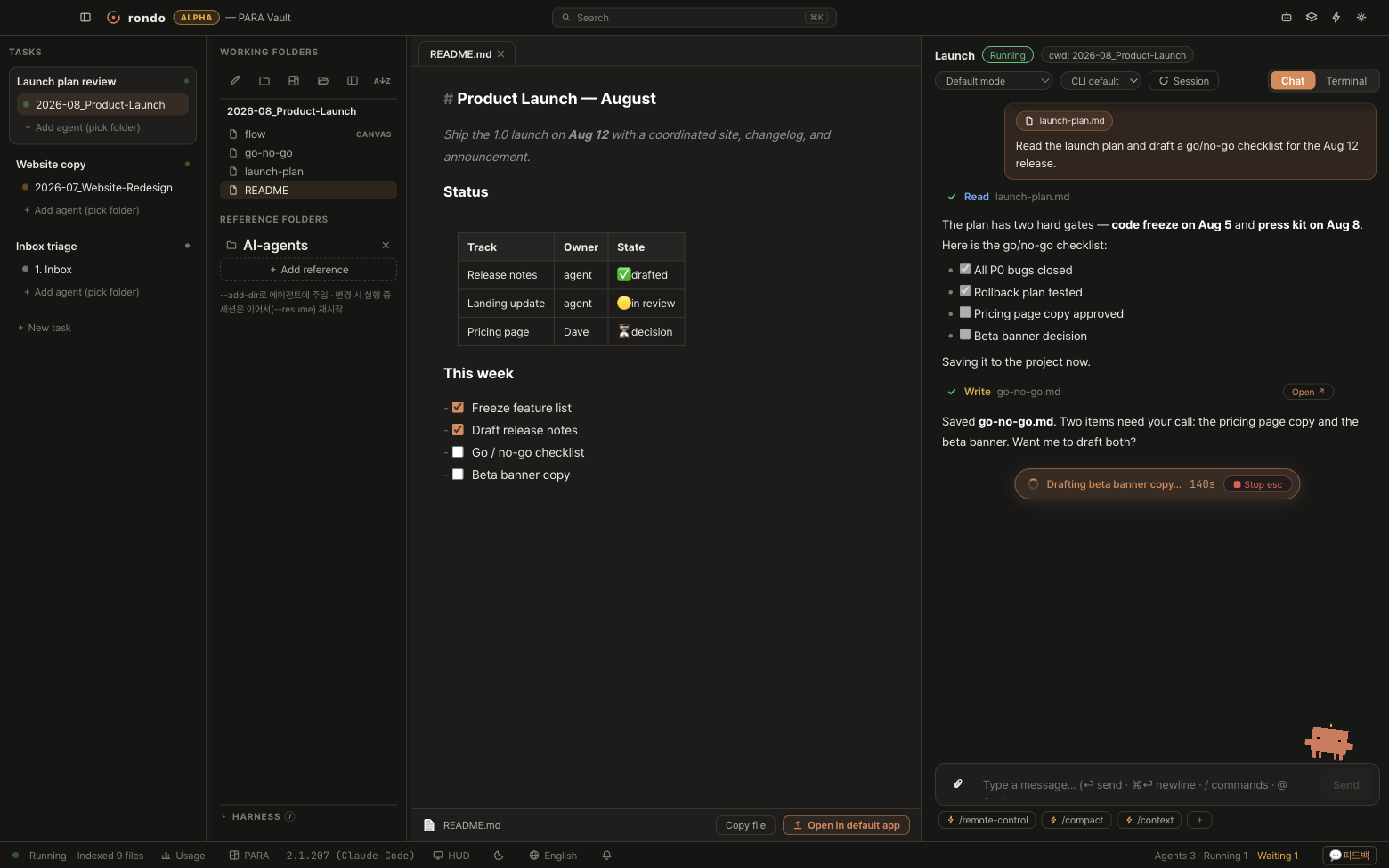
- 01 tasks
- 02 folders + harness
- 03 documents
- 04 agent
The real app on a real vault. One agent playing, one waiting for you — and the document it just wrote, already open.
Real Claude Code underneath — your ~/.claude, your skills, your MCP servers, your sessions. Resumable with --resume. One click to the raw terminal.
Why a workspace
Three reasons a folder beats a chat window.
No terminal, nothing lost
Ask in chat, watch every tool call as a card, read the result as a document. The real CLI runs underneath the whole time.
Context accumulates
What you make today is background knowledge tomorrow. The folder is the memory — you stop re-explaining every session.
Files stay yours
Everything is a plain local file on your disk. Nothing is uploaded. Delete the app and you lose an app, not your work.
The difference
This is how it changes
Pasting the same context into every new session
Open the folder — it already knows
A black screen and a wall of scrolling text
Chat cards, with the document opening beside them
A developer IDE where you use a tenth of the buttons
Four columns made for work: tasks, folders, documents, agent
Folder organization stays a New Year’s resolution
PARA scaffolded on day one — and the agent knows what it means
Switching windows to check if it’s done
When it’s your turn, the menu bar calls you with ⏸
Skills, MCP, hooks — no idea what’s in force
The harness in eight lines, zeros said out loud
In practice
Ask in words. Keep the files.
Three ways people actually use it — drawn from real folders.
-
“Draft a plan for my October ‘Using AI’ lecture.”
+ plan.md -
“Research cases and references to match the plan.”
+ references.md -
“Turn this into a two-hour curriculum with a slide outline.”
+ curriculum.md
Plan, research and draft in one folder
From the second ask on, you never re-explain the plan. It’s in the folder.
“Flag the risky clauses in this lease.”
“Sort the receipts folder for my VAT filing.”
“Look at this month’s workout log and plan next week.”
Define a specialist once, call it anywhere
Experts are saved as plain files in .claude/agents. Make one once, use it everywhere.
“Using last year’s hackathon folder, draft this year’s checklist and budget.”
checklist.md budget.md
Last year’s experience is this year’s starting point
Attach the old folder as a reference. The more an event repeats, the faster it gets.
The loop
Every task leaves the next one better off.
You already work this way. What you made last week is the brief for this week — nobody re-explains it to you. Agents don’t work that way. They start from zero unless you paste. Rondo removes the pasting by making the folder the memory.
A · B
“Read the launch plan and draft a go/no-go checklist for the Aug 12 release.”
Fifteen words. You had to name the date and the file.
+ go-no-go.md
A · C
“Draft the beta banner copy.”
You didn’t mention Aug 12. You didn’t mention the gates. It already knows — they’re in the folder now.
+ banner-copy.md
A · D
“Ship it.”
Two words.
+ release-notes.md
Prompt one: fifteen words. Prompt three: two. Same folder — it just knows more now.
Nothing was pasted. The artifacts are the context.
Structure
PARA by default — and the agent knows what the folders mean.
A fresh vault is scaffolded as PARA on day one: Projects, Areas, Resources, Archives. Then Rondo turns that structure into a role map the agent can query — not a naming convention it has to guess at.
- Roles, not names —
structure.ymlmaps roles to paths. Rename2. Projectsto anything; the role survives. - The agent asks instead of you telling — a built-in MCP server,
rondo-vault, rides into every session. The agent queries your tree, roles, and recent changes itself. - Search knows what archive means — last year’s dead project stops outranking this week’s work.
- Already organized your own way? Switch the preset to
customand map the roles onto the structure you have. Nothing is required.
.aiworkspace/structure.ymlprofile: para
roles:
  projects: "2. Projects"
  archive:  "5. Archive"

› vault_roles{ "profile": "para",
  "roles": { "projects": "2. Projects",
             "archive": "5. Archive" } }
The harness
One hundred percent of Claude Code, visible.
Agents, skills, hooks, MCP servers, permission rules, a model override — your power tools live scattered across .claude/, .mcp.json, settings.json and your home directory, and all of it silently applies the moment you start. Rondo reads the whole stack for the folder you’re about to work in, and shows it before you type.
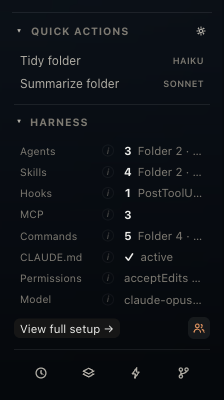
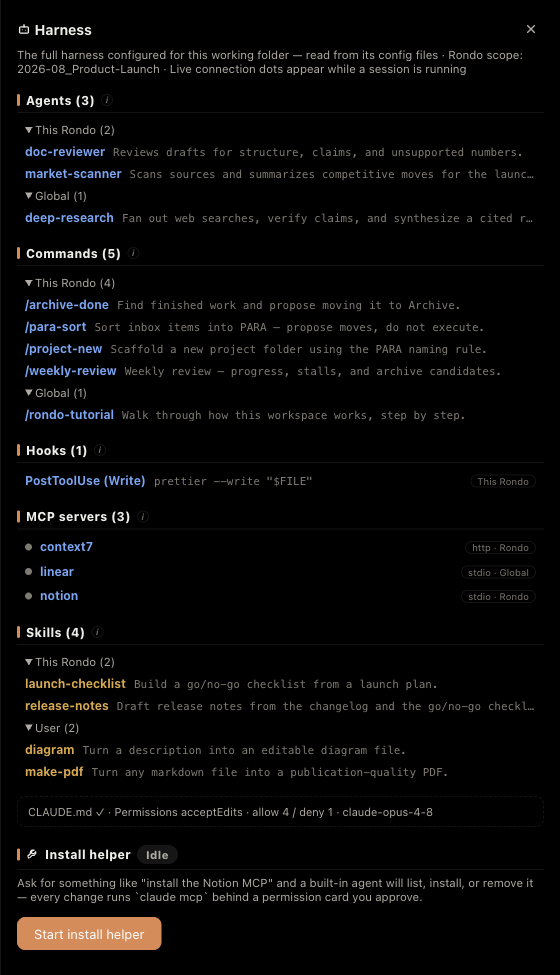
- Zeros are stated out loud — a folder with no hooks says
0. “Nothing will run” and “I don’t know what will run” are different sentences. - MCP servers show a pulse — connected, connecting, or failed, read live from the session, with a per-server tool count.
- Install by asking — “add the Notion MCP” goes to a built-in helper that runs
claude mcp addfor you, behind a permission card you approve.
It’s a reader, not a launcher. Rondo shows you the harness; Claude Code runs it. We don’t hide the CLI behind a form.
Comparison
Different from the bare terminal.
Same Claude Code, same sessions, same files. What changes is what you can see.
And that’s half of it
Four more things worth a look.
Every screen below is the real app, explained with the reason it exists — on the product page.
Subagents you can watch
A card per running worker — owner, tool count, seconds elapsed, live inner feed. Pop one out into an always-on-top window.
In detail →MCP with a pulse
Every server from every source, with a live dot and a per-server tool count. Plus rondo-vault, injected into every session so agents can ask where things live.
Menu bar & alerts
The icon pulses coral while agents play and turns amber the moment one needs you — with ⏸ 2 right in the menu bar. Walk away from the machine.
A Vault is just a folder
Markdown, canvas, PDF and office files beside the agent. Rondo’s state lives only in .aiworkspace/. Delete the app; you lose an app, not a vault.
FAQ
Frequently asked questions
I’m not a developer. Is this for me?
Yes — that’s the point. Rondo exists for research, planning, writing, and organizing: work that isn’t code. You ask in plain language and read the results as documents. The terminal is there if you ever want it, never because you need it.
I’ve never used Claude Code. Can I start here?
Rondo runs on top of the real Claude Code CLI, so you need a Claude account and the CLI installed once. After that, Rondo is the only window you open — and it’s a gentler place to learn Claude Code than the terminal ever was.
Do I have to reorganize my existing folders?
No. PARA is the default for new vaults, not a requirement. Point Rondo at any folder you already have, switch the structure preset to custom, and map the roles onto what you run today. Folders you already have are never touched.
Where do my files go?
Nowhere. Rondo uploads nothing; your files stay plain files on your disk, and Rondo’s own state lives in one .aiworkspace/ folder. The conversations themselves are Claude Code talking to Anthropic — exactly as they would from your terminal.
Can I use it on my Obsidian vault?
Yes. Wikilinks, callouts, canvases and frontmatter render the way you expect, because they’re the same files Obsidian reads. Rondo adds one folder of its own metadata and touches nothing else.
How much does it cost?
Rondo is free during the beta. Your Claude usage is your own — whatever plan or API key you already use with Claude Code, Rondo uses the same one.
Windows? Intel Mac?
Not yet — Rondo is macOS on Apple Silicon today. If you want to hear when that changes, write to us and you’ll be the first to know.
Download
Don’t let today’s work scroll away.
Hand over the folder.
Free during beta. macOS on Apple Silicon.
- Open the DMG and drag Rondo into Applications.
- First launch: macOS blocks it once, because the beta isn’t notarized yet. Approve it in System Settings → Privacy & Security → Open Anyway — step-by-step with screenshots.
- Open a folder as a Vault. Your agents are home.