
The product
Everything Rondo does,
and why it does it.
Every screen below is the real app on a real vault. Each section answers the same two questions: what is this, and why does it exist at all?
01
The whole loop on one screen
Why: a terminal shows you one thing at a time. Real work is a loop — you read something, an agent makes something, you read that, and it feeds the next thing. Every window switch inside that loop is a place to drop the thread.
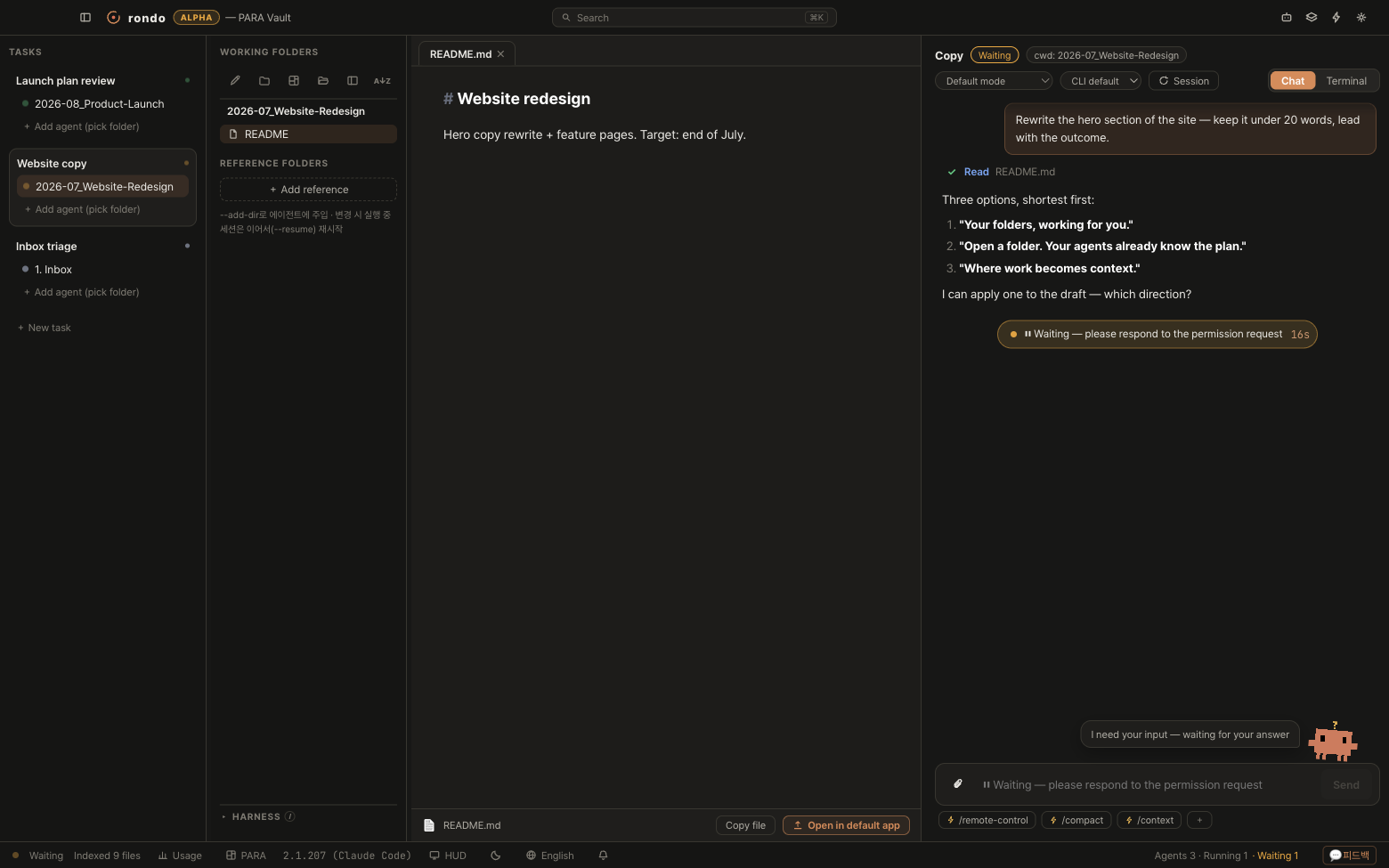
Four columns, left to right: tasks, folders, documents, agent. Nothing hides behind a window switch, and the loop always returns to you.
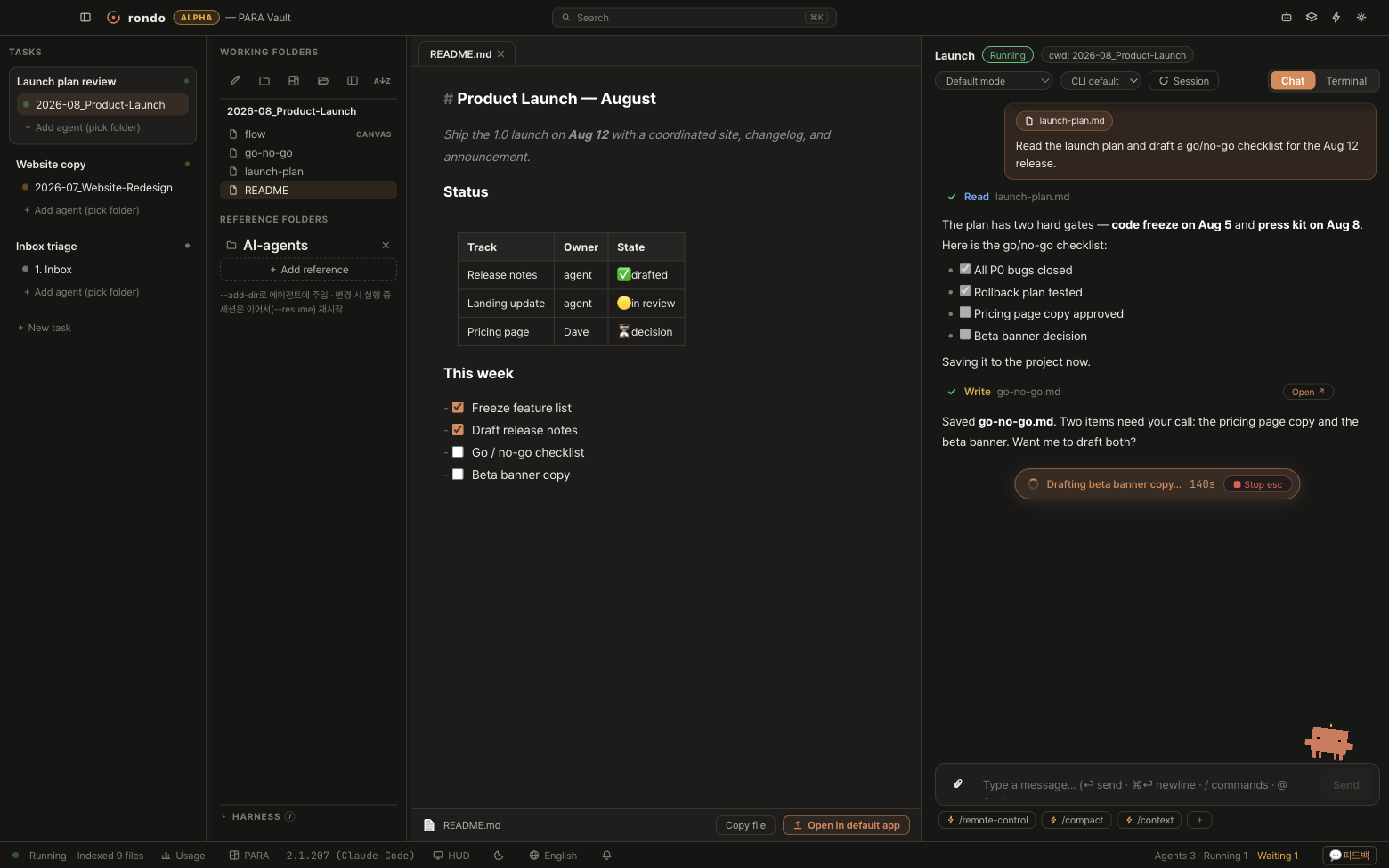
- The project is the unit — one folder plus one agent that lives in it. Pick the folder and you are working; there is nothing else to set up. Reference folders let it see more. — a task is a unit of intent, not a folder. It carries its own agents, each with its own folder and reference folders. “Launch review” can span three folders; “Inbox triage” can span one.
- Group them only if you want to — projects can stay at the top level. Drag one onto another when you finally feel like tidying up. — each agent inside a task has its own working directory. One task, several agents, several folders — the normal case, not the exotic one.
- Status at a glance — coral means playing, amber means waiting for you. A collapsed task still shows an aggregated dot, so the rail never lies.
- Documents render live — tables, checklists and headings, right next to the agent that wrote them.
02
Claude Code, native — and resumable
Why: most tools that put a UI on an AI CLI quietly become a smaller version of it. You lose flags, you lose sessions, you lose the escape hatch. Rondo wraps the interface, never the capability — because the day it costs you something, you’d be right to leave.
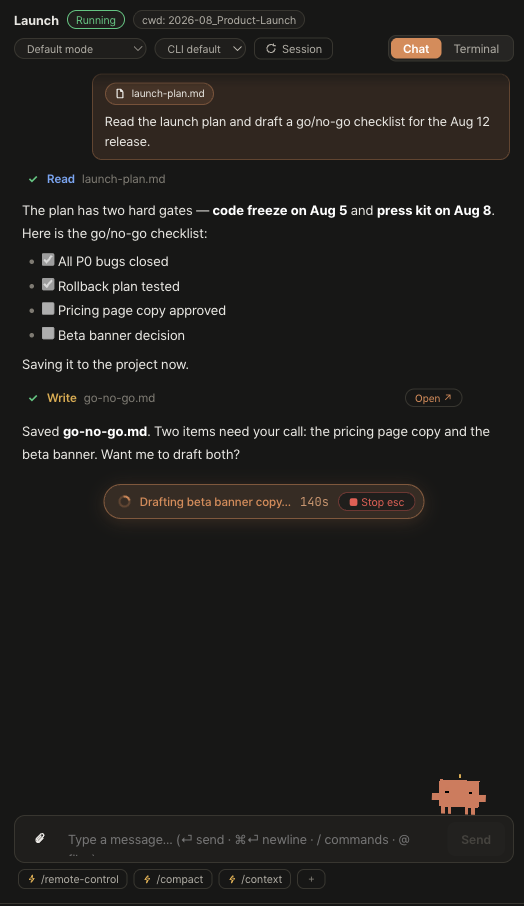
The real CLI runs underneath, wearing a chat interface. Every tool call becomes a card. Sessions resume where they left off. The raw terminal is one click away — on the same session.
- Tool calls as cards — Read, Write, Bash: each one visible, outputs a click away, and a Write card opens the file it just created in a document tab.
- Sessions resume, for real — Rondo keeps the CLI’s own session id and reattaches with
--resume. Close the app, come back tomorrow, continue the same conversation with its history intact. - Terminal mode is a handoff, not a second session — flip the toggle and Rondo hands the same session to a real PTY running the original TUI. Flip back and you’re still in it.
- You set the leash — permission modes per session, from confirm-every-tool to full auto. Model and thinking effort are per-agent too.
- Slash commands and skills, where you type —
/autocompletes across built-ins, skills and your own commands, each badged with its source. Pin the three you actually use to a chip bar. - Quick actions — folder chores like tidying or summarizing run in a separate session on a fast model, so they never pollute the conversation you care about.
03
Subagents you can actually watch
Why: when Claude fans out with the Task tool, a terminal gives you a spinner and a wall of text at the end. You can’t tell whether four workers are making progress or one is stuck in a loop burning tokens. Delegation you can’t observe is delegation you can’t trust.
Rondo gives every running subagent its own card — and lets you pull one out into a window that floats above everything else.
- A card per running subagent — its label, which agent owns it, how many tools it has called, how many seconds it’s been going, and a live feed of what it’s doing inside right now.
- Pop one out — send any subagent to its own always-on-top mini window and park it in the corner of your screen while you work in another app.
- A running count in the status bar — how many are alive and how many have finished, without opening anything.
- Definitions are part of the harness — the
.claude/agentsfiles that define your specialists are listed in the harness drawer with their descriptions and scope. Click one to open its source.
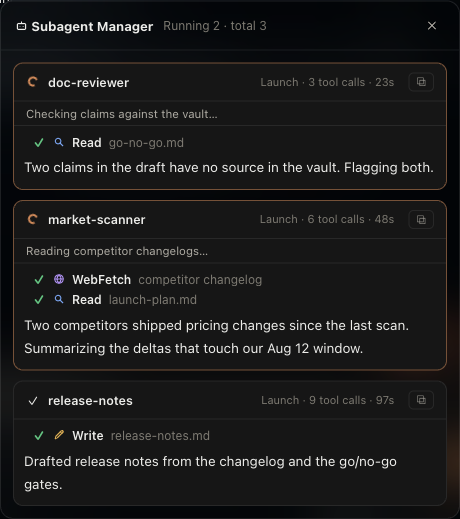
Subagents are Claude Code’s feature; Rondo makes them visible. Rondo doesn’t dispatch them for you — you ask your agent, and it decides to fan out, exactly as it would in a terminal.
04
The harness — everything that auto-applies
Why: your configuration is scattered across .claude/, .mcp.json, settings.json, installed plugins and your home directory. All of it silently applies the moment an agent starts working in a folder. The terminal never shows you the whole stack at once — so you find out what was in force by being surprised by it.
Rondo reads the whole thing for the folder you’re about to work in — and for every folder above it, exactly as Claude Code does — then shows it before you type.
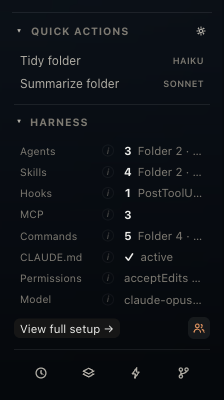
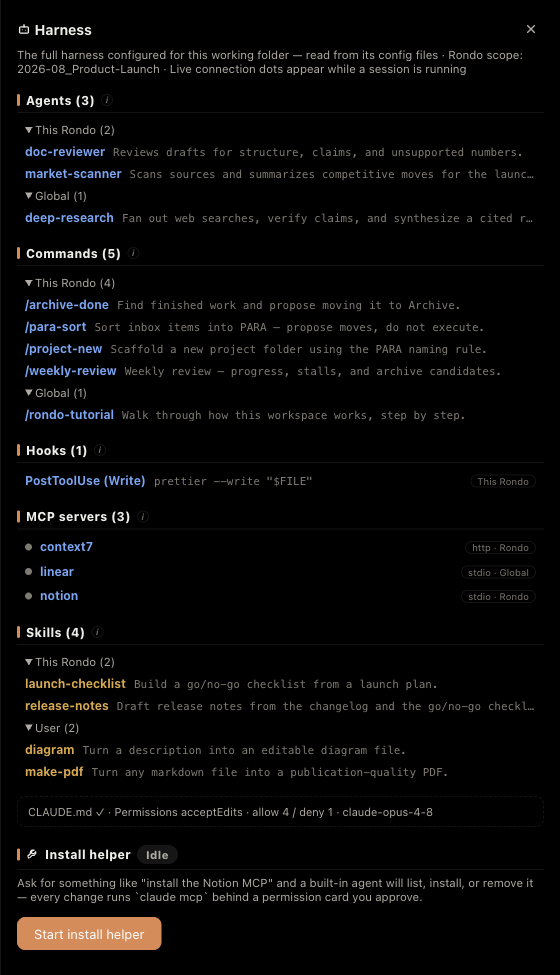
- Zeros are stated out loud — a folder with no hooks says
0. Absence is information: it’s the difference between “nothing will run” and “I don’t know what will run.” - Every row is sourced — this Rondo, a parent folder (named), global, plugin, user — grouped closest-first. This is where you find out that the skill you thought was project-scoped has been global the whole time.
- Inheritance is the normal case — commands and skills kept at your vault root apply to every Rondo underneath. A panel that only read the current folder would report
0while the session happily ran/para-sort; that is worse than no panel. - Account connectors, not just files — claude.ai connectors live on your Anthropic account, so nothing on disk describes them. They are listed anyway, with a live dot from the running session.
- Rows open their source — an agent opens its
.md; a hook opens thesettings.jsonthat declares it; a command opens in the command manager, ready to edit. - Hooks by event and matcher — with the exact shell line they’ll fire.
PostToolUse (Write)and the command behind it. - Permissions in numbers — the default mode, plus how many allow and deny rules are actually in force across project and global combined.
- Model override, surfaced — if a
settings.jsonpins a model for this folder, you see it here instead of wondering why the answers changed.
It’s a reader, not a launcher. Rondo shows you the harness; Claude Code runs it. We don’t hide the CLI behind a form.
05
MCP servers, with a pulse
Why: MCP config lives in at least three places, and a server that fails to connect fails quietly — your agent just behaves as if the tool never existed. You end up debugging a capability gap that is really a connection problem.
Rondo lists every configured server from every source, and shows a live dot while a session is running.
- Every source, one list — global
~/.claude.json, project-scoped entries, a project.mcp.json, and servers that arrive with plugins. Each row carries its transport and where it came from. - A live dot, not a guess — connected, connecting or failed, read from the running session. Plus a per-server tool count, so you can spot a server that connected and contributed nothing.
- One click to reconnect — when a server drops, restart the session straight from the status bar popup instead of hunting for the config.
- Install by asking — “install the Notion MCP” goes to a built-in helper that runs
claude mcp addfor you, behind a permission card you approve. It’s the CLI, narrated — not a settings form that drifts away from it.
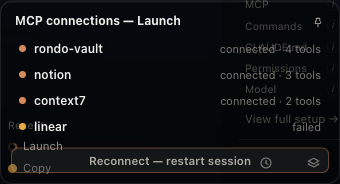
linear dropped — that’s why the button is there.And one server Rondo brings itself: rondo-vault
Every session, people paste their folder structure into the prompt so the agent knows where things live. That’s a tax you pay forever. Rondo runs a small MCP server in-process and injects it into every session, so the agent can just ask instead.
vault_tree— the shape of the vault, without you describing it.vault_search— search that understands roles: anything under your archive role is deranked, so last year’s dead project stops outranking this week’s.vault_roles— what your folders mean, not what they’re named.vault_recent— what actually moved lately.
It appears in your MCP list next to your own servers — same dot, same badge, inspectable. Nothing magic; just a peer.
› vault_search "go / no-go"
[
  { "path": "2. Projects/2026-08_Launch/go-no-go.md",
    "role": "projects",
    "score": 0.94 },
  { "path": "5. Archive/2025-11_Launch/go-no-go.md",
    "role": "archive",
    "score": 0.21 }
]
archive role → deranked, not hidden
06
Context reaches the agent on three axes
Why: this is the whole thesis. A human picks up last week’s work and simply knows the context. An agent starts at zero every session unless you paste. Rondo closes that gap three different ways, because context arrives from three different directions.
- Down — the CLAUDE.md cascade: global, vault, and every folder on the way to where the agent is working. Rondo shows the chain in order and tells you which levels exist and which don’t. Click a level to edit it inline, or add a memory with one line.
- Across — reference folders: attach other folders to an agent and they’re injected with
--add-dir. Each agent keeps its own. Change them while a session is running and Rondo resumes it, so the change lands without costing you the conversation. - Sideways — structure: a role map tells the agent what your folders mean, queryable through
rondo-vault. See Structure & PARA. - And the axis you never configure — whatever the agent wrote yesterday is just a file in the folder today. That’s the loop. It needs no setting at all.
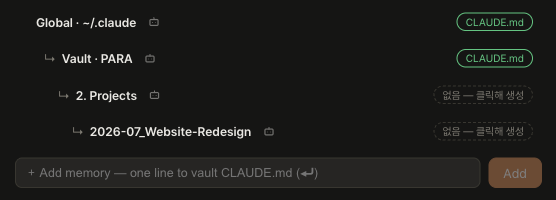
The panel shows which CLAUDE.md files apply, in inheritance order, and whether each one exists. It doesn’t yet show a single merged view of the effective result — that’s on the list, and we’d rather say so than imply otherwise.
07
PARA, wired into the agent
Why: folder names are for humans. 2. Projects means “active work” to you and means nothing to an agent. A structure profile turns your filing system into something an agent can query — which is the difference between a tidy folder and a workspace.
Rondo scaffolds a vault as PARA on day one, then tells your agents what the folders mean.
- Roles, not names —
.aiworkspace/structure.ymlmaps roles to paths: inbox, projects, areas, resources, archive. Rename2. Projectsto anything you like; the role survives and everything downstream keeps working. - Live-wired — save the profile and
vault_rolesand search ranking reflect it immediately. No reindex, no restart. - Scaffolded on day one — open a fresh folder and Rondo lays out the PARA skeleton for you, non-destructively. Folders you already have are left alone.
- The default, not the deal — switch the preset to
customand map the roles onto whatever structure you already run. PARA is the default because it’s the one that makes agent-driven work legible. It has never been a requirement.
.aiworkspace/structure.yml
profile: para
roles:
  inbox:     "1. Inbox"
  projects:  "2. Projects"
  areas:     "3. Area"
  resources: "4. Resources"
  archive:   "5. Archive"

› vault_roles
{ "profile": "para",
  "roles": { "projects": "2. Projects", … } }
08
Fermata — the app knows when it’s your turn
Why: an agent waiting for permission looks exactly like an agent thinking hard. So you either babysit the window, or you walk away and come back to something that stopped ten minutes in. Both are bad. The pause deserves to be a state with a name.
Rondo names all five, and every dot, HUD and notification speaks the same language.
- RestIdle, ready to play.
- PlayingAn episode in progress.
- Fermata 𝄐Paused for you. Your turn.
- CodaWrapped up.
- Off-keyWent off — resume.
- A state language, not a spinner — Rest · Playing · Fermata 𝄐 · Coda · Off-key. One vocabulary, driven from a single session state machine, so the rail, the HUD and the notification can never disagree.
- Native notifications — macOS tells you the moment a session needs you, even when Rondo is behind another app.
- A floating HUD — every agent’s state above any window. Click one to jump straight to the chat that’s waiting.
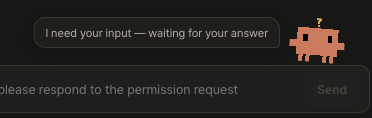
- Dot keeps watch — the mascot dances while agents play and taps you when one needs an answer. It’s the mark’s centre dot: the human, still in the loop.
09
Everything you need while you’re not looking at it
Why: the whole point of delegating is that you get to do something else. But an agent that needs you and can’t reach you has stopped — it just doesn’t look stopped. So the value of an agent workspace is decided by what it does when it isn’t the window you’re in.
Rondo puts its state in three places that survive you looking away: the macOS menu bar, a native notification, and a HUD that floats over everything.
- The menu bar knows before you do — the icon idles as a template mark that follows your light or dark menu bar, pulses coral while agents are playing, and turns amber the moment one needs you.
- A count, not just a colour — when sessions are waiting, the menu bar shows
⏸ 2right in the title. Running work stays as pulse alone, so the number only ever means “your turn.” - Click it for the whole board — every agent, its task, and its state. Click a row to jump straight into that session. Right-click for the native menu: open Rondo (
⌘⇧R), toggle the HUD, quit. - Notifications that land you in the right place — a native banner with sound the moment a session hits Fermata. Click anywhere on it and you’re in that chat, with the banner cleared.
- A floating HUD when you want it up — every agent’s state above any window, wherever you park it.
- Dock badge — the waiting count on the app icon, for when the menu bar is busy.
One honest note: beta builds aren’t notarized yet, and macOS can refuse notification registration for an unnotarized app. Rondo falls back to terminal-notifier and then AppleScript so you still get told — but the real fix is notarization, and it’s on the list.
10
Documents live next to the work — and stay yours
Why: the artifact is the point. If you have to leave the app to read what the agent just made, the loop breaks. And if the app owns the artifact, you can never leave. Rondo refuses both.
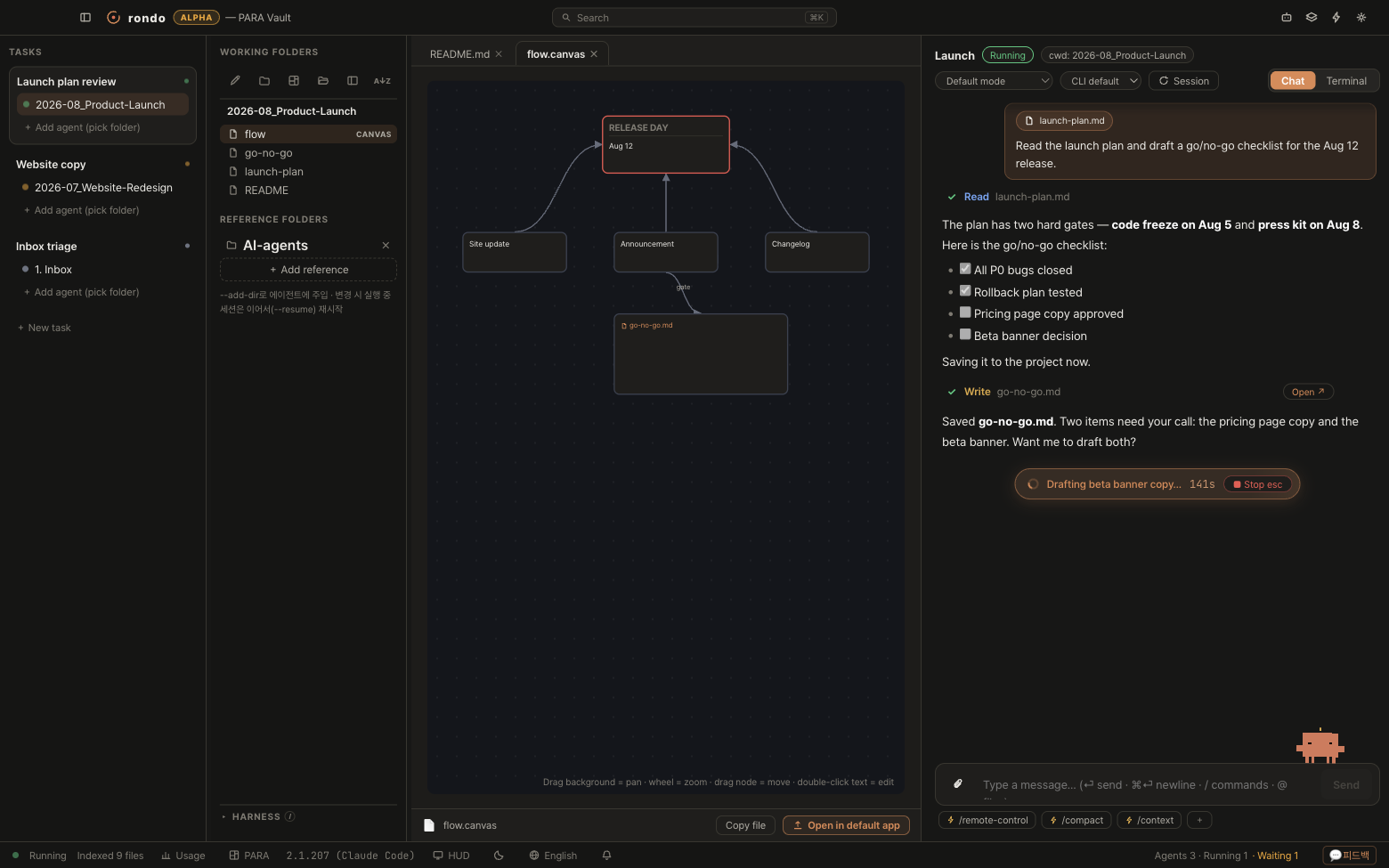
Markdown with live preview, canvases, PDFs and office files, in tabs beside the agent. All of them plain files on your disk.
- Files are the truth — Rondo’s metadata lives only in
.aiworkspace/. Your notes, drafts and canvases are never touched. Delete the app and you lose an app, not a vault. - Obsidian-friendly — wikilinks, callouts, canvases and frontmatter render the way you expect, because they’re the same files Obsidian reads.
- Agent output opens itself — a Write card links straight to the new file in a document tab. Read what just happened without going looking for it.
- Editable where it counts — tables and checklists you can tick, right beside the agent that wrote them.

Hear the whole piece for yourself.
Free during beta. macOS on Apple Silicon.
Download Rondo